

Folder can't be removed from catalog
The folder "Pictures" can't be removed from this catalog. To reproduce on LR 13.3 / Mac OS 14.5:
1. Create a user "john" and log in to "john" (i.e. so there's a folder /Users/john/Pictures).
2. Download and open this catalog in LR:
3. Observe the Folders panel shows just Pictures and no subfolders:

4. Right-click Pictures in the Folders panel and do Remove. Observe the task Removing Folder appears in the progress bar but never finishes:

The Pictures folder remains in the Folders panel, and when you exit LR you get:
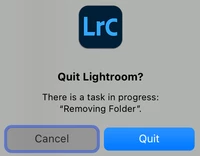
5. Log in as some user other than "john", download and open the catalog above, and observe that the Pictures folder has a subfolder Lightroom marked as missing:

6. Right-click Pictures and do Remove. Observe that it is removed from the catalog.
* * *
This catalog is a stripped-down copy of one of my main catalogs, with all the photos and other folders removed.
This isn't as-designed behavior, for two reasons:
1. It can't be as-designed that Remove hangs.
2. If you create a new catalog and import a photo from Pictures, you can remove the photo and then the Pictures folder from the catalog.
Tested on LR 13.3 / Mac OS 14.5 using a virgin Mac OS virtual machine on Parallels.


 AdChoices