
helener29768148
Participant
November 23, 2022
Answered

Folder search not working

  • November 23, 2022
  • 1 reply
  • 434 views

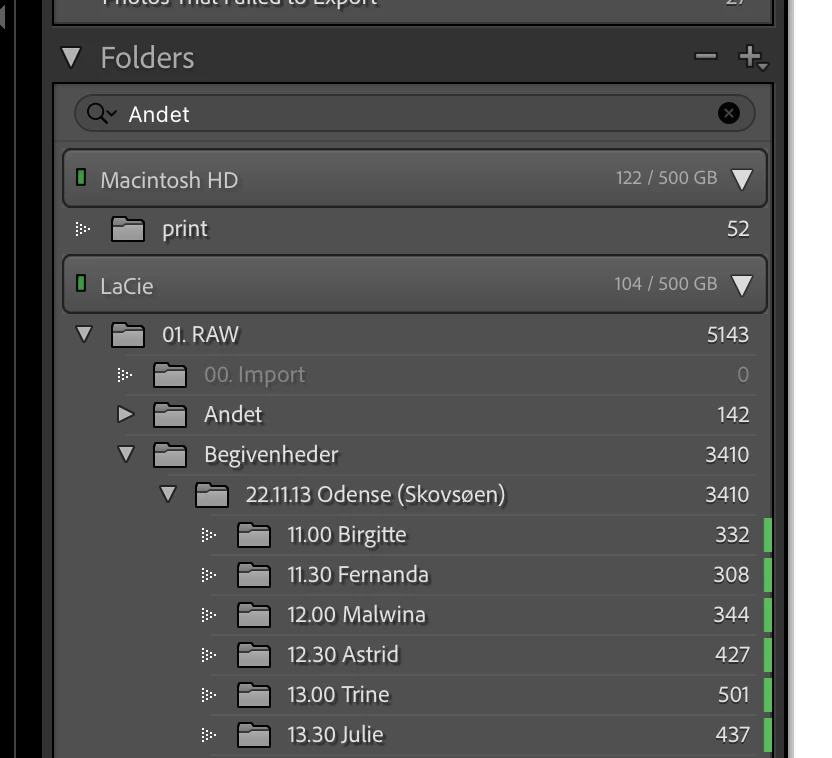
I'm no longer able to search my folders. Nothing happens when I type a folder name in the search bar. As you can see I tried "Andet" which is a folder I have, but it just keep showing all folders. 


I have Lightroom Classic (12.0.1) on MacOS Ventura (13.0.1)
 

This topic has been closed for replies.
Correct answer johnrellis

1. Do Catalog Settings > General > Show to open Finder on your current catalog folder.


2. Exit LR.


3. In that folder, delete the file "<catalog> Helper.lrdata". 


4. Restart LR. It will recreate the file.


That file caches information about folders, and there have been a few reports over the years of it getting corrupted.

1 reply

johnrellis
Legend
November 23, 2022

Try resetting LR's preferences:
https://www.lightroomqueen.com/articles-page/how-do-i-reset-lightrooms-preferences/


LR sometimes soils its preferences file, and resetting it can fix all sorts of wonky behavior. That article explains how to restore the old preferences if resetting doesn't help.

helener29768148
Participant
November 23, 2022

Thank you. I've tried uninstalling and reinstalling and resetting LR's preferences, but I still have the issue.