
Inspiring
August 1, 2020
Question

Folder will not update after sync it.

  • August 1, 2020
  • 3 replies
  • 335 views

LR Classic 2020 will not update catalog folder after synchronizing it.  I tried removing the folder, LR will not do this.  I have tried a half dozen times to re-synchronizing the parent folder, No change.  This is what the catalog looks like;
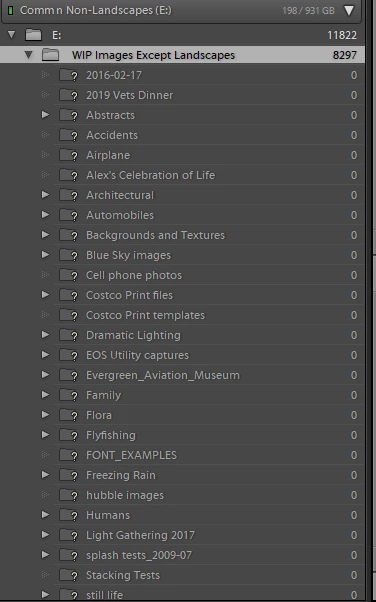
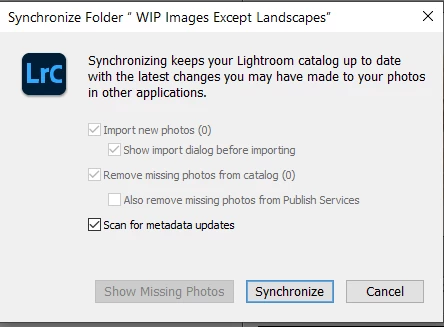
The above window is what I get when I try to synchronize the "E" drive and/or the Parent folder WIP Images Except Landscaptes.

I have checked the drive via Explorer and the image count is short over 7000 files.  But if I right click on the folder in LR Classic and go to Properties, I get the correct number of files.


I am running a Windows 10 Pro 64bit machine with 64gb of RAM.


Any ideas.  

This topic has been closed for replies.

3 replies

KBStudioAuthor
Inspiring
August 3, 2020

Found the a solution.

After many attempts to get LR Classic to sychronize, update, or even re-import the folder, I gave up and created a "new" catalog.  Imported all the drives that made up the old catalog and Lightroom Classic again refused to import the one folder.


So, in the middle of the night, I decided to rename the folder from Windows and attempt a sychronization.  I worked.  Folder with the new name is represented just like all the others.  Why Lightroom Classic had an issue with the name is the new questions.  But I am happy that at least I have a fully operational catalog now.

GoldingD
Legend
August 1, 2020

So , in the Folders Panel, what appears to be the Parent Folder,

"WIP Images Except Landscapes"

Right click on that folder, choose Update Folder Location, navigate to it. and choose it. You should not have to repeat this for the Child Folders.


KBStudioAuthor
Inspiring
August 1, 2020

Tried this twice just now.  LR did absolutely nothing.  Right click on Parent folder WIP Images Except Landscapes.  Navigated to the drive.  Chose the Parent folder.  It shows up in the window as the folder chosen.  Click OK.  Nothing!!!

dj_paige
Legend
August 1, 2020

"LR Classic 2020 will not update catalog folder after synchronizing it."


what does "update catalog folder" mean?


If you are trying to get rid of the question marks, the neither synchronizing nor importing is a solution. The solution is explained here: http://www.computer-darkroom.com/lr2_find_folder/find-folder.htm

KBStudioAuthor
Inspiring
August 1, 2020

I have tried using Missing Folder and it doesn't import or update the selected folder.  It acts like it is going to, but when you select Mirge Folders nothing happens.  Most of the "?" folders show up as having "0" file in them.  Yet there are files in all folders and the files show up briefly when you use "Find Missing Folder".  LR just doesn't "import" them.  


Might be time to revert to the last "Backup" catalog and start over updating the catalog.


dj_paige
Legend
August 1, 2020

Did you move the photos outside of Lightroom Classic? Did you import the photos/folders or synchronize the folders?