
edirish
Participant
March 20, 2023
Answered

Folders in Library with extra info

  • March 20, 2023
  • 1 reply
  • 387 views

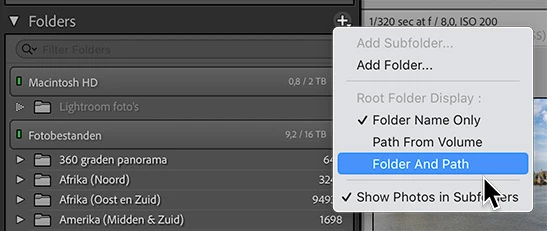
Recently, I somehow managed to add extra info after each parent folder name that I don't want there. So the normal (Folder) 2023                      75 now looks like (Folder) 2023 /Pictures/Pictures/2023           75. How do I get rid of the file path description that is now with each parent folder and not the sub-folders? It looks very cluttered and I would like to get it back to the original way I had it set up. Any suggestions would be greatly appreciated. Running Windows 10 with all current updates and LRC 12.2.1 with all current update.
This topic has been closed for replies.
Correct answer JohanElzenga

That's a display setting you can change under the plus icon. Change it to 'Folder Name Only'.


1 reply

Ian Lyons
Community Expert
Community Expert
March 20, 2023

Your description suggests that the 'Folders' panel is displaying the parent folder. Normally, this can be resolved by right-clicking on the top most folder in the hierarchy, then chosing 'Hide Parent' from the folder context menu (see attached screenshot).


If above doesn't help, then please add a screenshot showing the folders, extra info, etc. Making the panels as wide as possible will also help us see the full extent of the issue.


edirish
edirishAuthor
Participant
March 21, 2023

Hopefully the screen shot shows up. If you look at the highlighted year, 2023, you will see the folder, 2023, then -Pictures\Pictures\2023. What I am trying to get rid of is "-Pictures\Picturs\2023" for that parent folder as well as that same issue with the rest of the parent folders. Trying to rename the folder does not work. How can I eliminate "-Parent\Parent\Year" from all the parent folders?

JohanElzenga
Community Expert
JohanElzengaCommunity ExpertCorrect answer
Community Expert
March 21, 2023

That's a display setting you can change under the plus icon. Change it to 'Folder Name Only'.


-- Johan W. Elzenga