
Participant
August 18, 2024
Question

Folders missing in Catalog and can't back up either after latest update

  • August 18, 2024
  • 1 reply
  • 246 views

Hi everybody, 


I am not sure when the latest update happened but now I am missing a number of recent folders in my most recent catalog. Strangely enough, older ones are still there and the latest two are there as well but the ones in between are not. So I tried looking for them and I have saved them on my external hard drive per usual, but for some reason, I can't find them in Lightroom. 


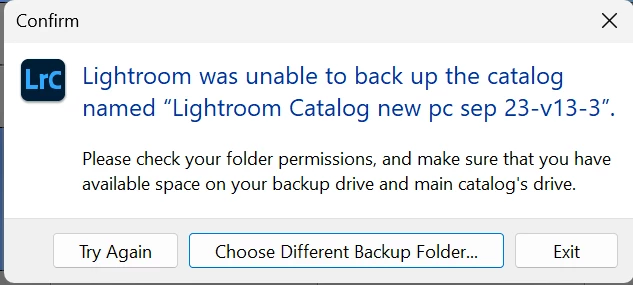
So I thought maybe I just look at an earlier version, and then I get asked to back up - and that is not working either  (see screenshot). I looked here in the forum, but I can't seem to find the answer. Short of re-importing all those folders and starting work on them again, I am at a loss. Oh, and I have plenty of space ... so not sure why that would be an issue.


Plus of course, the backup not working is not helping as I may lose them again if I don't back up...


Any clever ideas what I can do? 


This topic has been closed for replies.

1 reply

dj_paige
Legend
August 18, 2024

I am not sure when the latest update happened but now I am missing a number of recent folders in my most recent catalog.


This is a common complaint, but usually the reason is because Lightroom CLassic (accidentally) upgraded the wrong catalog file (probably an older catalog file). So you need to go through the catalogs on your hard disk, open them one-by-one, until you find the one you want. —OR— restore a recent backup of your catalog file.


Backup not working is often solved by restarting the computer.

Participant
August 18, 2024

thank you! I tried restoring a recent backup but they were still missing, but will try go through each of the others now and see if I find the missing ones. still odd that it happens so often? 

dj_paige
Legend
August 18, 2024

I tried restoring a recent backup but they were still missing


Which likely means the folders were gone before the upgrade, which had nothing to do with their being missing.


still odd that it happens so often?


But it seems as if the upgrade of the catalog was correct, the folders were not there in the backups either.