Known Participant
September 26, 2017
Answered

Form Lightroom to Photoshop

  • September 26, 2017
  • 1 reply
  • 377 views

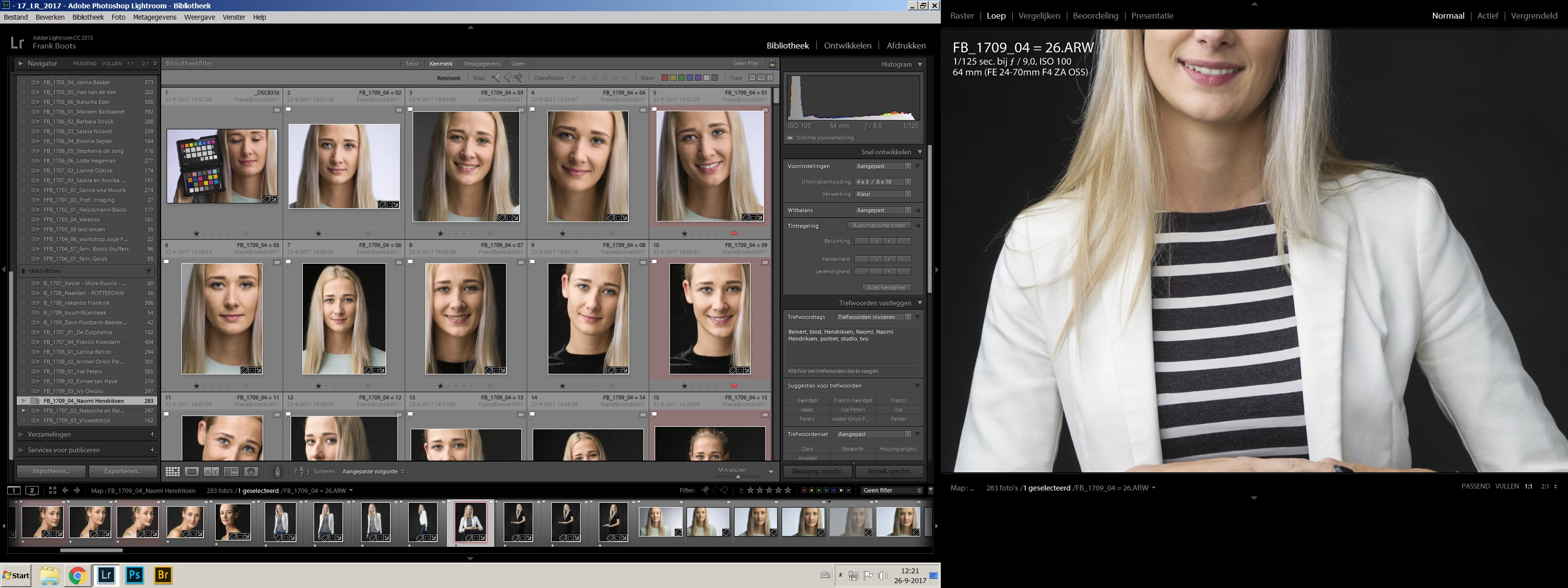
I want to edit from lightroom photo in Photoshop. Normally I do that in Widows with "Ctrl + E". This does not work anymore. When I go to "edit in" in lightroom, all options, including Photoshop, are in gray and are not working. How do I fix this?
    This topic has been closed for replies.
    Correct answer Just Shoot Me


    And there are Question marks on all of your folders. LR can't find your images, That is why all the option in "Edit In" are grayed out.

    Either your NAS is off line or your computer, and LR, can't see it.

    1 reply

    Just Shoot Me
    Legend
    September 26, 2017

    Is there an exclamation mark on the image you are trying to send to PS?

    Known Participant
    September 26, 2017

    No, the image is a camera raw file from a sony A7R2 with the filename FB_1709_04 = 01.ARW

    Known Participant
    September 26, 2017

    Also photos that I could yesterday open perfect from lightroom in photoshop, have exactly the same problem