peterw16400243
Participant
April 8, 2017
Answered

Fotos im Ordner "bearbeitet" werden nicht alle dargestellt

  • April 8, 2017
  • 1 reply
  • 195 views

In meinem Ordner "bearbeitet" sind 154 Fotos im Explorer verzeichnet. In Lightroom werden aber nur 37 dargestellt. Ein Untertext der fehlenden Fotos verweist darauf, dass es sich um ein mögliches Dublikat handelt. Beim Import ist die Funktion "Dublikat vermeiden" aber abgeschaltet.

Wie kann ich alle bearbeitete Fotos in Lightromm auflisten?

Danke für die Hilfe im voraus.

Psimyki
    This topic has been closed for replies.
    Correct answer Rob_Cullen

    Have you tried to Synchronize the folder in the Lightroom Folders panel?

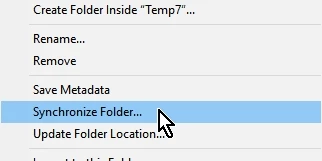
    1. Right-click the "edited" work folder (with the 37 photos), select "Synchronize Folder...

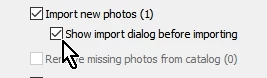
    2. Check  to "Show import dialog before importing"

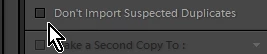
    3. Un-check the option "Don't Import Suspected Duplicates"

    4. [Import]

    1 reply

    Rob_Cullen
    Community Expert
    Rob_CullenCommunity ExpertCorrect answer
    Community Expert
    April 8, 2017

    Have you tried to Synchronize the folder in the Lightroom Folders panel?

    1. Right-click the "edited" work folder (with the 37 photos), select "Synchronize Folder...

    2. Check  to "Show import dialog before importing"

    3. Un-check the option "Don't Import Suspected Duplicates"

    4. [Import]

    Regards. My System: Windows-11, Lightroom-Classic 15.3, Photoshop 27.5, ACR 18.3, Lightroom 9.3, Lr-iOS 10.4.0, Bridge 16.0.3 .