
Participant
May 7, 2023
Question

From lightroom, how do I choose to open using normal or beta photoshop?

  • May 7, 2023
  • 4 replies
  • 5300 views

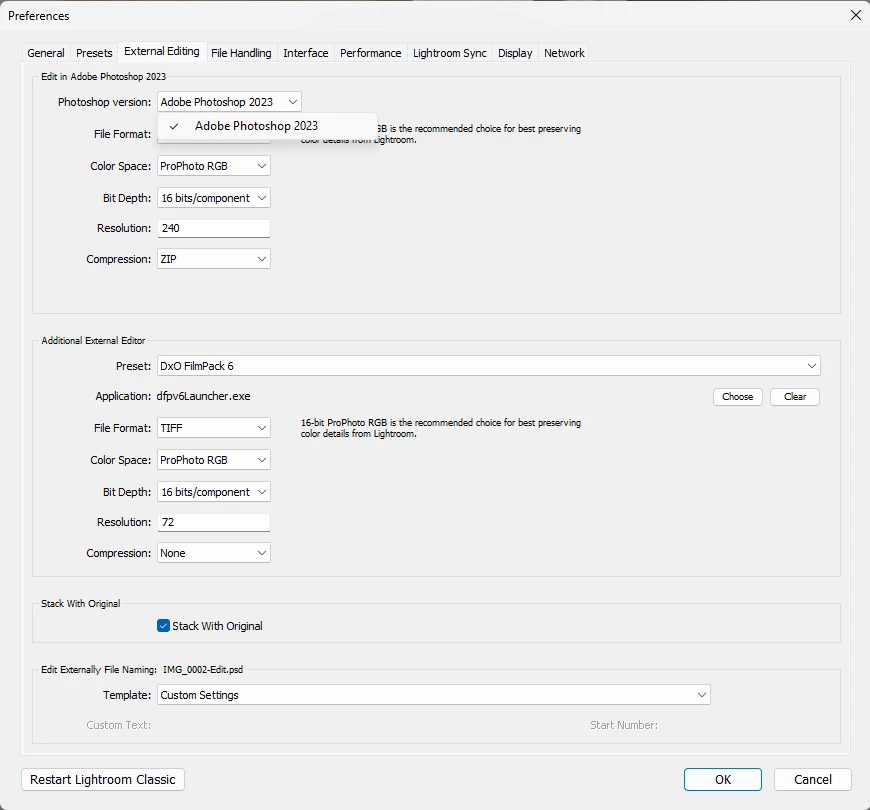
Hi Cory. Recently I saw that the option to choose which PS to use was added in the new lightroom but it seems to only work in Mac. In Windows, you can only see the current one and not the beta. Can you confirm this? 
This topic has been closed for replies.

4 replies

Participant
August 13, 2023

Le problème c'est que les deux on le même nom, le nom "béta"  n'apparaît pas sous le ".exe", et le sélectionneurs externe crois qu'ils la déjà sélectionner ! Comment faire?????


Participant
August 13, 2023

J'ai trouver la solution, j'ai renommée le fichier ".exe" de BETA  Photoshop renommée en photoshop Beta, et sa marche!

Known Participant
May 18, 2023

WE have tried 100's variations to be able to run both PS and PSbeta jointly from the Edit>Preferences>External Editing with no success. LR defaults to the last version that was used. MAC users have this capability, so why not us PC users of Windows?

Inspiring
May 25, 2023

I posted about this bug as well:

https://community.adobe.com/t5/lightroom-classic-discussions/p-edit-in-photoshop-sends-it-to-the-photoshop-beta-not-2023-no-option-to-choose/m-p/13790880


The only way to "fix" this is to uninstall the Beta AND Photoshop 2023.  Then reinstall Photoshop 2023.  This is not an issue on the Mac version - it only seems to affect the Windows users.  I am hoping Adobe can fix this in the next Lightroom Update.  Is there a place to officially report this bug?  

AxelMatt
Community Expert
Community Expert
May 15, 2023

Hi @Rikk Flohr: Photography ,


I'll see more and more posts about this topic. Can you please say more. Is this a bug in the Windows version of Lightroom or is it only available on MacOS?


My System: Intel i7-8700K - 64GB RAM - NVidia Geforce RTX 3060 - Windows 11 Pro 25H2 -- LR-Classic 15 - Photoshop 27 - Nik Collection 8 - PureRAW 6 - Topaz Photo AI
Sameer K
Community Manager
Community Manager
May 10, 2023

Hey, @azmil77. I'll help you work around this. Lightroom identifies this through the registry on Windows.


This information is populated based on Windows registries. If you only want to use Photoshop Beta, you can try solution two from this content: https://helpx.adobe.com/lightroom-classic/kb/edit-photoshop-command-missing-photoshop.html


Add the Photoshop.exe from the Photoshop Beta folder instead of the Photoshop 2023 folder.


Let me know how it goes. Thanks!
Sameer K


mikel510
Known Participant
May 7, 2023

Encore une fois de plus un problème .Sous windows ça ne fonctionne pas . Photoshop bêta est installée tout est à jour .

Dans Lightroom je clic droit pour "Modifier une photo avec photoshop 2023 ,est c'est la Bêta qui s'ouvre ?.

Je n'ai que "Modifier dans Adobe Photoshop 2023" La bêta n'apparaît pas ?  

Pour moi il y a toujours conflit. Quelqu'un peut me donner une réponse ? merci.

Sameer K
Community Manager
Community Manager
May 8, 2023

Hey, @mikel510. I'll clarify this for you. Lightroom identifies this through the registry on Windows.


The drop-down is intended to allow selecting another version of Photoshop on the computer. I have Photoshop 2022 & Photoshop 2023 with Photoshop Beta set as an additional external editor.


Give this a try & let me know how it goes. Thanks!

Sameer K.