
slow_shutter
Participant
July 13, 2022
Question

Fuji profles missing from LrC/Camera Raw

  • July 13, 2022
  • 4 replies
  • 238 views

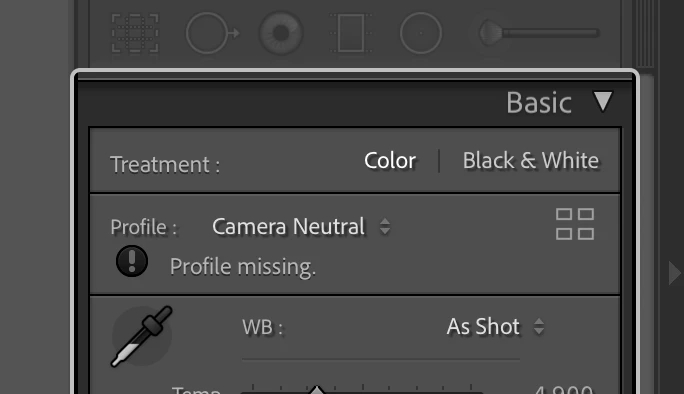
I've seen this topic discussed several times in the Adobe Support Community, but none of the answers so far have worked and I have yet to see anyone from Adobe chime in on the topic. At some point a LR/CR upgrade resulted in no longer having certain camera-specific profiles show up in the profile panel for .RAF images from my Fuji X100T. Instead, If I open a file in which I originally applied one of the missing profiles, I get a 'profile missing' warning in the profiles panel (see photo). I'm particularly frustrated by the loss of a 'camera neutral' profile that I used often as a baseline profile. I'm running Mac OS 12.4 Monterey, PS 23.4.1, LrC 10.4, and Camera Raw 14.1, but this has been a problem for several versions of LrC/CR.
This topic has been closed for replies.

4 replies

Sean McCormack
Community Expert
Community Expert
July 14, 2022

Camera Neutral isn't a camera matching profile for Fujiflim. It's a Canon one for me. 

It sounds like you're applying a preset that contains the Camera Neutral profile, which isn't available for Fujifilm. 

If you're looking for a more neutral look for Fuji, try the Astia profile. 

Sean McCormack. Author of 'Essential Development 3'. Magazine Writer. Former Official Fuji X-Photographer.
GoldingD
Legend
July 13, 2022

My bad, Camera Neutral is not a Fuji Film Sim, I gave too much importance to the camera in use.


So, while profile browsing, what other profiles are presented? 


slow_shutter
Participant
July 14, 2022

slow_shutter
Participant
July 13, 2022

These are the only 'camera matching' profiles that appear:

GoldingD
Legend
July 13, 2022

What happens when you browse for the camera matching profiles?