
gturinsky
Participant
June 6, 2024
Answered

Gesichtserkennung falsche Stichwort Zuordnung

  • June 6, 2024
  • 1 reply
  • 191 views

Ich habe die automatische Gesichtserkennung eingeschalten und mit der Bearbeitung begonnen.

Nun muss ich feststellen, dass die von mir erfassten Personen in der Stichwortliste nicht unter "Personen" sondern unter "Orte/Thailand" eingeordnet wurden.
Wie kommt es dazu, wie kann ich das korrigieren?


Ich arbeite unter Windows  11 mit der aktuellsten Lightroom Classic Version.
This topic has been closed for replies.
Correct answer johnrellis

[This post contains formatting and embedded images that don't appear in email. View the post in your Web browser.]


Google translation: "I have noticed that the people I entered in the keyword list are not listed under "People" but under "Places/Thailand"."


In the Keyword List panel, look at Places > Thailand. Is there a * after it?  That indicates where new names attached to faces are placed.


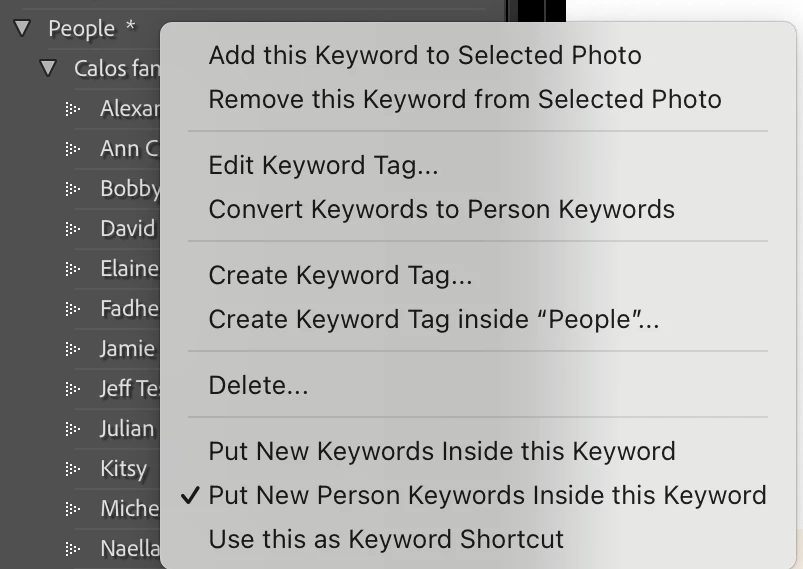
Navigate to the People keyword, right-click it, and select the menu item Put New Person Keywords Inside This Keyword. The * should now appear after People:


1 reply

johnrellis
johnrellisCorrect answer
Legend
June 7, 2024

[This post contains formatting and embedded images that don't appear in email. View the post in your Web browser.]


Google translation: "I have noticed that the people I entered in the keyword list are not listed under "People" but under "Places/Thailand"."


In the Keyword List panel, look at Places > Thailand. Is there a * after it?  That indicates where new names attached to faces are placed.


Navigate to the People keyword, right-click it, and select the menu item Put New Person Keywords Inside This Keyword. The * should now appear after People:


gturinsky
gturinskyAuthor
Participant
June 7, 2024

works like a charm - thank you.


Had a bit of work to move them to the right place piece by piece but now it's fine.