
Ghost Pictures folder
Hi,
It seems that on non-english installations, LR 15 is trying to find the Windows 11 "Pictures" folder and fails. I'm running Windows 11 french and my "Pictures" folder is actually named "Images". I'm running LR in french. In Library mode, LR 15 tries to include the Pictures folder but marks it with a black exclaim icon, therefore indicating that it cannot find folders in it. This ghost folder cannot be removed. Its infotip says "Subfolders missing. Please relink". I don't know what "relinking" means in that case.
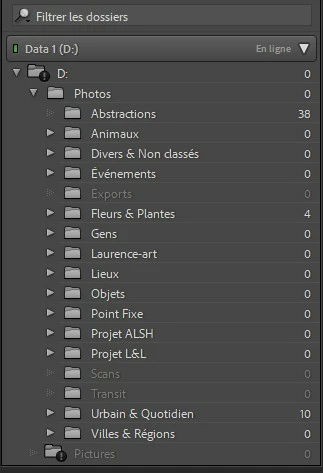
- Switching to the english language doesn't help.
- I can however synchronize this ghost "Pictures"
folder and actually add the subfolders of my Images folder.
- If I then remove them from LR, I can then remove the ghost Pictures folder. It will however be back after restart, still marked with the black exclaim icon.
- I have the same problem on my laptop.
By the way, I don't know why LR insists on including the Images/Pictures folder in the folder tree. I don't use it for my photos.
This problem is new to LR 15.
Thanks in advance.


 AdChoices