Known Participant
October 3, 2025
Answered

GPS data loaded from track log wildly inaccurate

  • October 3, 2025
  • 4 replies
  • 832 views

I was recently on a walking holiday in Tuscany, Italy. I took a lot of photos. I have an app, Geotag2 Pro, installed on my iPhone which logs times and GPS locations. When I got home I loaded the photos into Lightroom Classic (14.5.1 on macOS) and told Lightroom to apply the tracklog. To be fair the results were all in Tuscany, but all over the place. Photos taken a couple of minutes apart were miles apart on the map.

I contacted GeoTag support for advice and they told me to download their tagging app which I did and used on copies of my Tuscany photos. I then  created a separate Lightroom Catalog with just those copies. The results were much, much better; there were a few anomolies but they could be explained by the way the Geotag 2 Pro works and if their logging app can't place a photo in a reasonable place in the time line, it doesn't do anything to it.

Has anyone else experienced this problem, or have any ideas for improving the situation? The Geotag logging app seems to work better but does involve an extra step and it takes a lot longer than using Apply Tracklog in Lightroom.

I'm looking forward to any feedback.

Jack
Correct answer johnrellis

LR shows the capture times correctly in all cases.


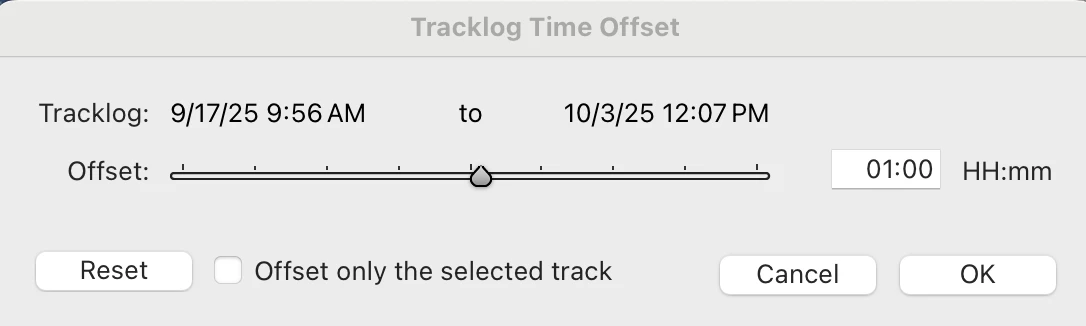
A big mistake on my part: Jao was wrong about the location of the photo but quite correct in his second instruction to set the tracklog time offset to 1 hour.


When you do that:


then LR's Auto-Tag correctly tags the location of the photo:


I misread the contents of the .gpx file for 2005:09:23.  I apologize for the confusion.


The Geotag Photos Pro desktop app uses the method I described in option 1 above, assuming the camera clock was set to the time zone of the GPS track. The app also offers a Fix Camera Time command, which accomplishes the same end as LR's Set Tracklog Time Offset.

4 replies

Community Expert
October 4, 2025

I do this all the time with track logs created using Gaia GPS (excellent app unfortunately bought out by outside magazine so probably will not be excellent for much longer) and have never seen more than a few feet of inaccuracy simply caused by the accuracy of the GPS. What do these track logs look like? Are they perhaps far apart in time just sporadically taking points, or like normal track logs every 30 seconds or so. If far apart, the interpolation algorithm that is used will matter tremendously, whether it sticks to a coordinate in the track log that is closest in time (nearest neighbor interpolation) or does a linear interpolation between two track points straddling the image in time. If the track log is very sparse (a point only every 10 minutes for example), these two methods will give wildly different results. No clue what Lightroom does but I would be surprised if it wasn't an interpolation method.

Known Participant
October 4, 2025

I use Geotag 2 Pro which I have configured to record a GPS location every minute and to treat anything within 50 yards of that as the same location. The app can create track logs which Lightroom can use. It also has a desktop app that will apply the GPS location directly to the photos. I downloaded the same photos as before and used the desktop app to apply the tracklog before creating a Lightroom catalog just for those photos. The results were far, far more accurate, some being out by the few feet as you described above.

This particular trip involved about 250 photos taken over a week, Lightroom applied the GPS data in a few seconds, the desktop app took a few minutes to do the same thing. I'm wondering if Lightroom works simply on the time and does not include the date, which I would agree would be a strange omission.

I used the tracklog within Lightroom several times already and the results have been fine, the differences this time is the number of photos involved and the trip was over a number of days and not just one.

johnrellis
Legend
October 3, 2025

"Photos taken a couple of minutes apart were miles apart on the map."


Many people, including me, use LR's Auto-Tag command to assign GPS coordinates to photos from GPX track logs, and I don't recall seeing any similar reports over the years.  Normally, Auto-Tag uses smooth interpolation of a photo's position, using the track points immediately preceding and following the photo's capture time; so I wouldn't expect to see wild disparities in location for photos taken close together in time.


I think the most effective way to troubleshoot this is to share a GPX tracklog and a few of the photos that are getting placed incongruously.  Maybe there's a LR bug lurking, or maybe there's some other explanation.

Known Participant
October 4, 2025

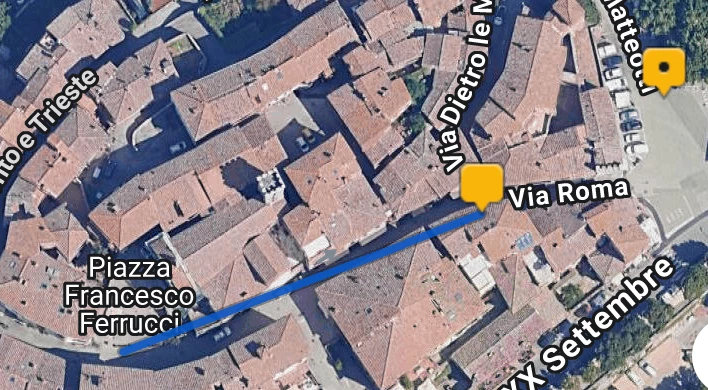
I've attached some files. _DSC9546.NEF is a photo. Screenshot1 is the Lightroom map module showing where that photo has been placed by Apply Tracklog. The group of 3 locations above that is the Tuscany town of Radda in Chianti which is where these pictures belong. The location below with 27 photos is Siena which is where we were heading. Screenshot2 is the same as Screenshot1 with the photo correctly located. The tracklog is in the folder as well.

The link below is to a Dropbox folder.

https://www.dropbox.com/scl/fo/ivy5uf1mmzy6060zwv4h9/AF4AxBuj0FWCluAmFq5LVJc?rlkey=uj3togt3ohryheezppgv2lf0f&dl=0

Community Expert
October 4, 2025

Looked at this and you are dealing with a time zone offset issue. If you dial in a 6 hour offset in the tracklog in Lightroom it tags correctly. I think that the timezone is not set correctly in the gpx track file: <!-- TZ: 7200 --> or the timezone is not set correctly in your camera.

dj_paige
Legend
October 3, 2025

Sounds like @johnrellis is the person who might know the answer.

dj_paige
Legend
October 3, 2025

What version NUMBER of MacOS?

Known Participant
October 3, 2025

Ventura 13.7.8.

I've got an Intel iMac 2019 and I can't instal above Ventura.