
Participating Frequently
April 24, 2020
Question

GPU Issues when in develop module - Lightroom Classic

  • April 24, 2020
  • 11 replies
  • 1763 views

Hi All,


I need your collective help with an strange and frustrating issue.


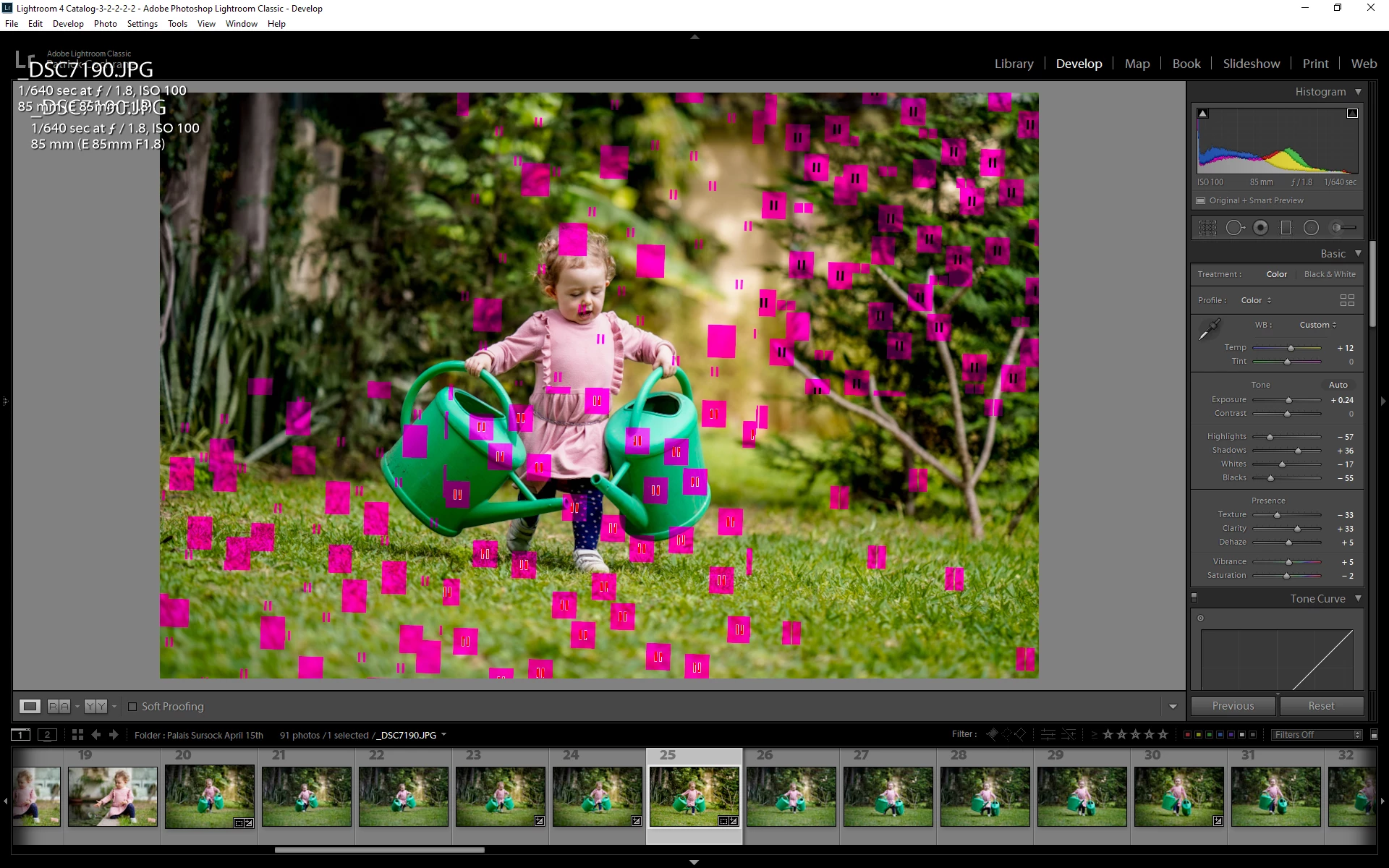
Very suddenly last night after importing a batch of photos, I noticed that when trying to do some preliminary edits in lightrooms develop module, a bunch of red/green/black/blue colored blocks would appear all over the image. See screen shot for reference.


At no time prior to last night did I ever encounter such an issue and for the last month or so I have been using lightroom/photoshop on a daily basis.


I checked that my Display driver was upto date (GeForce GTX 1050ti). it was not so I installed the updated version (445.87), however the issue persisted.


I decided to disable GPU acceleration to see if made any difference as the issue was limited to the Develop Module. It corrected the issue, however I don't consider this as a final solution, just a temporary work-around.


While creating the attached Screen Shot in Photoshop, I noticed that the same thing happens when in Photoshop. Unfortuately when disabiling GPU support in photoshop there is a noticeable performace decline, so again I would prefer not to have to resort to this quick fix.


I spoke to Adobe Support and they were massively unhelpful. 1 hour and a half online only to be told the my Graphics Card is not supported. Even though it is and has been working perfectly since 2018. After presenting this information to them they simply ignored any further chat communication.


Anyone got any ideas as to what could be the issue. Is it possible its a hardware fault that only happens during Lightroom/Photoshop usage?


Any help on the above would be appreciated.


All the best,


Patrick


{Thread renamed by moderator}

This topic has been closed for replies.

11 replies

Sahil.Chawla
Adobe Employee
Adobe Employee
April 24, 2020

Hi Patrick,

Sorry to hear about the poor experience with support.

As the issue is getting fixed by disabling the graphics processor it seems there is a conflict with the graphics drivers or the graphics card itself. However, I agree disabling the graphics processor is not a permanent fix, and the graphics card you're using right now is a powerful one. It should work with both Photoshop and Lightroom without any issues.

You may try fixing the issue by following the steps mentioned in the articles below for both Lightroom and Photoshop and let us know how it goes.

Lightroom: https://helpx.adobe.com/lightroom/kb/lightroom-gpu-faq.html

Photoshop: https://helpx.adobe.com/photoshop/kb/troubleshoot-gpu-graphics-card.html


Also, it would be really helpful to know the exact operating system version and the versions of Photoshop and Lightroom you're working on. You can check it by going to the Help > System Info menu.

Regards,
Sahil

Participating Frequently
April 25, 2020

Hi Sahil,

Many thanks for helping out in this matter.

I'm copying the System info below for your reference.

Please note that you will notice that I'm currently using an older verion (441.12) of the graphics driver for my Geforce 1050ti. Yesterday, when I wrote my oringal post I had the most recent version installed - 445.87, which I believe was released fairly recently. I was advised that installing a slighly older version might help as my system was working properly until a 2 days ago now. It's worth noting that prior to this issue arrising, I was using a considerably older version of the 1050ti drivers (3XX.XX) (can't remember which one specifically)

The current installed version of the driver 441.12 was done via a full clean install.

Please let me know if you need any additional information.

Cheers,

P.

---------------------------------

Lightroom Classic version: 9.2.1 [ 202004070813-7699d98a ]
License: Creative Cloud
Language setting: en
Operating system: Windows 10 - Business Edition
Version: 10.0.18362
Application architecture: x64
System architecture: x64
Logical processor count: 12
Processor speed: 3.6 GHz
SqLite Version: 3.30.1
Built-in memory: 16338.7 MB
Real memory available to Lightroom: 16338.7 MB
Real memory used by Lightroom: 2127.8 MB (13.0%)
Virtual memory used by Lightroom: 5043.1 MB
GDI objects count: 805
USER objects count: 2748
Process handles count: 2253
Memory cache size: 19.7MB
Internal Camera Raw version: 12.2.1 [ 415 ]
Maximum thread count used by Camera Raw: 5
Camera Raw SIMD optimization: SSE2,AVX,AVX2
Camera Raw virtual memory: 819MB / 8169MB (10%)
Camera Raw real memory: 853MB / 16338MB (5%)
System DPI setting: 96 DPI
Desktop composition enabled: Yes
Displays: 1) 1920x1200, 2) 1920x1200
Input types: Multitouch: No, Integrated touch: No, Integrated pen: Yes, External touch: No, External pen: Yes, Keyboard: No

Graphics Processor Info:
DirectX: NVIDIA GeForce GTX 1050 Ti (26.21.14.4112)


Application folder: C:\Program Files\Adobe\Adobe Lightroom Classic
Library Path: I:\Lightroom\Lightroom 4 Catalog-3-2-2-2-2.lrcat
Settings Folder: C:\Users\C\AppData\Roaming\Adobe\Lightroom

Installed Plugins:
1) AdobeStock
2) Facebook
3) Flickr
4) Luminar 4
5) Nikon Tether Plugin

Config.lua flags: None

Adapter #1: Vendor : 10de
Device : 1c82
Subsystem : 86131043
Revision : a1
Video Memory : 4018
Adapter #2: Vendor : 1414
Device : 8c
Subsystem : 0
Revision : 0
Video Memory : 0
AudioDeviceIOBlockSize: 1024
AudioDeviceName: Realtek Digital Output (Realtek High Definition Audio)
AudioDeviceNumberOfChannels: 2
AudioDeviceSampleRate: 48000
Build: Uninitialized
Direct2DEnabled: false
GL_ACCUM_ALPHA_BITS: 16
GL_ACCUM_BLUE_BITS: 16
GL_ACCUM_GREEN_BITS: 16
GL_ACCUM_RED_BITS: 16
GL_ALPHA_BITS: 0
GL_BLUE_BITS: 8
GL_DEPTH_BITS: 24
GL_GREEN_BITS: 8
GL_MAX_3D_TEXTURE_SIZE: 16384
GL_MAX_TEXTURE_SIZE: 32768
GL_MAX_TEXTURE_UNITS: 4
GL_MAX_VIEWPORT_DIMS: 32768,32768
GL_RED_BITS: 8
GL_RENDERER: GeForce GTX 1050 Ti/PCIe/SSE2
GL_SHADING_LANGUAGE_VERSION: 4.60 NVIDIA
GL_STENCIL_BITS: 8
GL_VENDOR: NVIDIA Corporation
GL_VERSION: 4.6.0 NVIDIA 441.12
GPUDeviceEnabled: false
OGLEnabled: true


P.S. I have not included the GL_EXTENSIONS part as its insanely long! Please advise if it is required.