
K. Cee
Participant
February 28, 2024
Answered

Gradiationskurve und Masken in LR

  • February 28, 2024
  • 1 reply
  • 228 views

Liebe LR Anwender


Entweder ist das ein neuer Bug oder ich hab etwas verstellt. Wenn ich aktuell eine Maske (zb. Himmel oder Hintergrund wähle), dann die Gradiationskurve ändere, übernimmt es das aufs komplette Bild, nicht nur auf den Maskenbereich.

Ähnliches Problem wenn ich eine Maske auswähle und in der GK Änderungen vornehme, dann anschliessend eine neue Maske erstelle um auch auf dieser GK Anpassungen zu machen,  sind immer noch die Einstellungen der ersten Maske auf der GK. Irgendwie lässt sich die Einstellung der Gradiatonskurve nur auf das Gesamtbild anwenden. Sehr strange irgendwie.

Kann das jemand kurz verifizieren? Oder hab ich versehentlich eine Einstellung aktiv?
Liebe Grüsse

K. Cee
This topic has been closed for replies.
Correct answer dj_paige

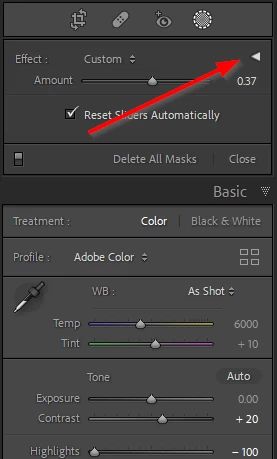
You are probably using the sliders in the Basic panel, which should apply to the entire image. You want to use the masking sliders. I think you have accidentally collapsed the section with the masking sliders; and you can fix it as shown by clicking on the little triangle


1 reply

dj_paige
dj_paigeCorrect answer
Legend
February 28, 2024

You are probably using the sliders in the Basic panel, which should apply to the entire image. You want to use the masking sliders. I think you have accidentally collapsed the section with the masking sliders; and you can fix it as shown by clicking on the little triangle


K. Cee
K. CeeAuthor
Participant
February 28, 2024

oh jesus, there's another gradiation curve at the top. unfortunately i overlooked it. thank you very much for the hint. sometimes the solution is closer than you think 🙂