
Participant
January 13, 2025
Question

Graphics acceleration has been disabled

  • January 13, 2025
  • 2 replies
  • 416 views

Hallo, bei mir wird die Grafikbeschleunigung deaktiviert.

Öffne ich LrC im Bibliothek-Modul wird meine GPU noch unterstützt, erst beim Wechsel ins Entwickeln-Menü wird sie daktiviert.
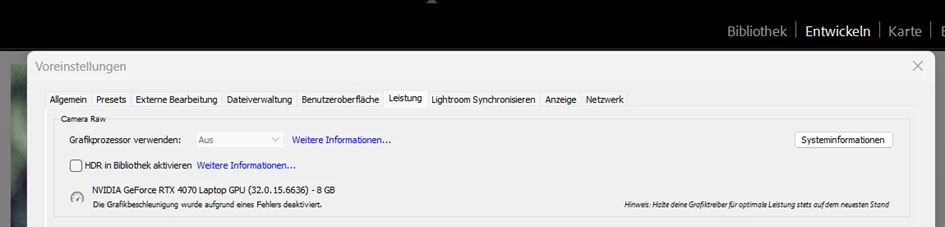
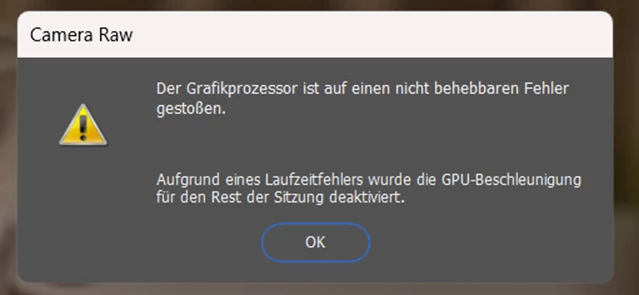
Auch ACR zeigt einen Fehler beim öffnen eines Bildes:
OS: Windows 11

Grafikkarte: NVIDIA GeForce RTX 4070 mit aktueller Studiotreiber

2 replies

Community Manager
January 24, 2025

Hi @Michael33394274xfqd! Could you please go to the Nvidia Control Panel > Program Settings > Choose Lightroom Classic and set it to high performance?

You can also do the same in Windows: Settings > Graphics settings > Graphics performance preference > Desktop app > Browse > “c:\program files\adobe\Adobe Lightroom Classic\lightroom.exe > Options > High Performance.

Let me know if this helps!

Best, Alek

*(If you mention me with an @, like @Aleke, I’ll get a notification and can respond faster.)*
Participant
January 13, 2025
Lightroom Classic-Version: 14.1.1 [ 202412150940-551fb044 ]
Lizenz: Creative Cloud
Spracheinstellung: de
Betriebssystem: Windows 11 - Home Premium Edition
Version: 11.0.26100
Anwendungsarchitektur: x64
Systemarchitektur: x64
Anzahl logischer Prozessoren: 20
Prozessorgeschwindigkeit: 2,9GHz
SQLite-Version: 3.36.0
CPU-Auslastung: 1,0%
Stromquelle: Akku
Integrierter Speicher: 14029,4 MB
Dedizierter GPU-Speicher, der von Lightroom verwendet wird: 273,3MB / 7948,0MB (3%)
Für Lightroom verfügbarer phys. Speicher: 14029,4 MB
Von Lightroom verwendeter phys. Speicher: 2105,6 MB (15,0%)
Von Lightroom verwendeter virtueller Speicher: 2355,9 MB
Anzahl GDI-Objekte: 1044
Anzahl BENUTZER-Objekte: 2572
Anzahl Prozess-Handles: 2450
Cache-Speichergröße: 0,0MB
Interne Camera Raw-Version: 17.1 [ 2098 ]
Maximale Anzahl Threads, die Camera Raw verwendet: 5
Camera Raw SIMD-Optimierung: SSE2,AVX,AVX2
Virtueller Speicher in Camera Raw: 101MB / 7014MB (1%)
Physischer Speicher in Camera Raw: 37MB / 14029MB (0%)
 
Cache1: 
Preview1- RAM:42,0MB, VRAM:48,0MB, 20241223-2N8A8201.CR3
NT- RAM:42,0MB, VRAM:48,0MB, Combined:90,0MB
 
Cache2: 
m:0,0MB, n:22,3MB
 
U-main: 99,0MB
 
DPI-Einstellung des Systems: 120 DPI
Desktop-Komposition aktiviert: Ja
Standardvorschaugröße: 1440 Pixel
Monitore/Anzeigegeräte: 1) 1920x1080
Eingabetypen: Multitouch: Nein, integrierte Toucheingabe: Nein, integrierter Stift: Nein, externe Toucheingabe: Nein, externer Stift: Nein, Tastatur: Nein
 
Informationen zum Grafikprozessor: 
DirectX: NVIDIA GeForce RTX 4070 Laptop GPU (32.0.15.6636)
Anfangsstatus: GPU getrennt
Benutzerpräferenz: Automatisch
HDR in Bibliothek aktivieren: AUS
 
Anwendungsordner: C:\Program Files\Adobe\Adobe Lightroom Classic
Bibliothekspfad: C:\Users\mbull\Pictures\Lightroom\Lightroom Catalog-v13-3.lrcat
Einstellungen-Ordner: C:\Users\mbull\AppData\Roaming\Adobe\Lightroom
 
Installierte Zusatzmodule: 
1) AdobeStock
2) DxO PureRAW 4
3) DxO PureRAW 4 Importer
4) Flickr
 
Config.lua-Flags: 
 
Adapter Nr. 1: Anbieter : 10de
Gerät : 2820
Subsystem : 8bbe103c
Version : a1
Grafikspeicher : 7948
Adapter Nr. 2: Anbieter : 8086
Gerät : a7a0
Subsystem : 8bbe103c
Version : 4
Grafikspeicher : 800
Adapter Nr. 3: Anbieter : 1414
Gerät : 8c
Subsystem : 0
Version : 0
Grafikspeicher : 0
AudioDeviceIOBlockSize: 1024
AudioDeviceName: System Default - Speaker (Realtek(R) Audio)
AudioDeviceNumberOfChannels: 2
AudioDeviceSampleRate: 48000
Build: LR5x26
Direct2DEnabled: false
GL_ACCUM_ALPHA_BITS: 16
GL_ACCUM_BLUE_BITS: 16
GL_ACCUM_GREEN_BITS: 16
GL_ACCUM_RED_BITS: 16
GL_ALPHA_BITS: 0
GL_BLUE_BITS: 8
GL_DEPTH_BITS: 24
GL_GREEN_BITS: 8
GL_MAX_3D_TEXTURE_SIZE: 16384
GL_MAX_TEXTURE_SIZE: 32768
GL_MAX_TEXTURE_UNITS: 4
GL_MAX_VIEWPORT_DIMS: 32768,32768
GL_RED_BITS: 8
GL_RENDERER: NVIDIA GeForce RTX 4070 Laptop GPU/PCIe/SSE2
GL_SHADING_LANGUAGE_VERSION: 4.60 NVIDIA
GL_STENCIL_BITS: 8
GL_VENDOR: NVIDIA Corporation
GL_VERSION: 4.6.0 NVIDIA 566.36
GPUDeviceEnabled: false
OGLEnabled: true
[shortened by Mod.]
johnrellis
Legend
January 13, 2025

[This post contains formatting and embedded images that don't appear in email. View the post in your Web browser.]


Google translation:


You've got the latest graphics driver installed, so that's not the problem.


Try deleting the file "Camera Raw GPU Config.txt" as detailed here:
https://helpx.adobe.com/lightroom-classic/kb/troubleshoot-gpu.html#solution-3


That will cause LR to reevaluate the capabilities of your GPU.

Participant
January 14, 2025

I've already tested that.
The problem still exists.