
Participant
January 15, 2023
Answered

Gray Preview

  • January 15, 2023
  • 2 replies
  • 390 views

I am facing a gray preview issue in Lightroom all images are in gray. I did try to follow these instructions but still can fix the issue.https://helpx.adobe.com/th_th/lightroom-classic/kb/lightroom-gives-error-preview-cache.html


I also try to reinstall with an older version which was work before it also not solved the issue.


Thanks in advance 
This topic has been closed for replies.
Correct answer Per Berntsen

This might be caused by a defective monitor profile.

As troubleshooting, and as a possible temporary fix, try setting the monitor profile to sRGB. (use Adobe RGB if you have a wide gamut monitor)

If this fixes the issue, you should ideally calibrate your monitor with a hardware calibrator. This will also create and install a custom monitor profile that will be more accurate than sRGB.


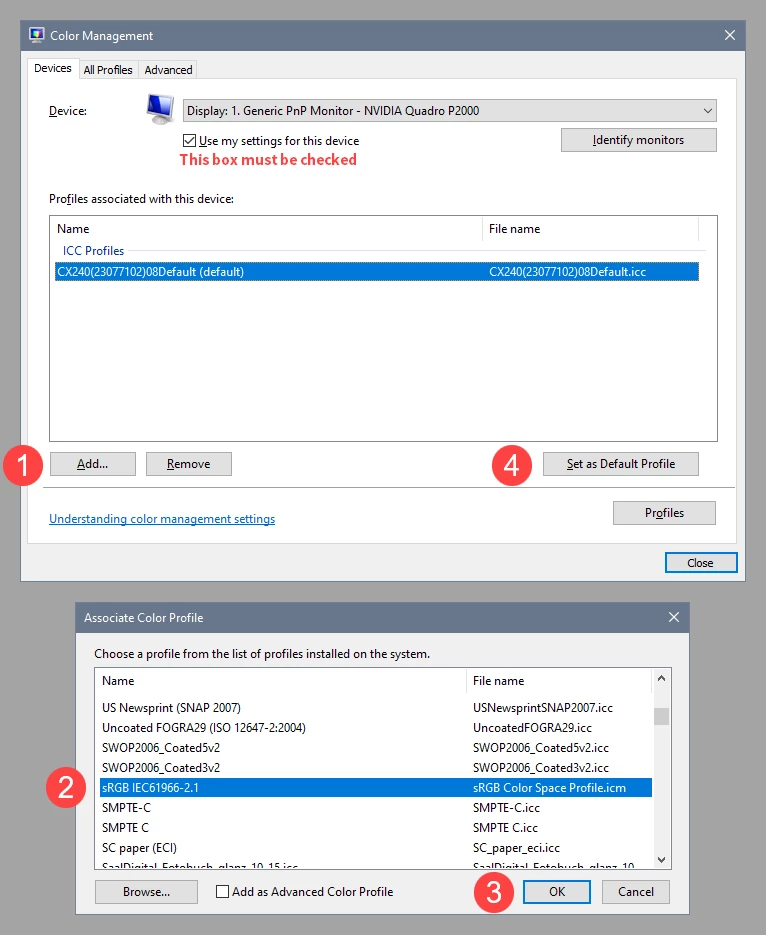
With Lightroom closed, press the Windows key + R, type colorcpl in the box and press Enter.

Add the sRGB profile (sRGB IEC61966-2.1), then set it as default.


2 replies

Per Berntsen
Community Expert
Per BerntsenCommunity ExpertCorrect answer
Community Expert
January 15, 2023

This might be caused by a defective monitor profile.

As troubleshooting, and as a possible temporary fix, try setting the monitor profile to sRGB. (use Adobe RGB if you have a wide gamut monitor)

If this fixes the issue, you should ideally calibrate your monitor with a hardware calibrator. This will also create and install a custom monitor profile that will be more accurate than sRGB.


With Lightroom closed, press the Windows key + R, type colorcpl in the box and press Enter.

Add the sRGB profile (sRGB IEC61966-2.1), then set it as default.


Participant
January 18, 2023

Thank you so much this setting solved my issue!.

DdeGannes
Community Expert
Community Expert
January 15, 2023

Please post additional info about the version number of Lightroom Classic you are using and also your Win Operating System.

See the screen capture for more info.


Regards, Denis: iMac 27” mid-2015, macOS 11.7.10 Big Sur; 2TB SSD, 24 GB Ram, GPU 2 GB; LrC 12.5,; Lr 6.5, PS 24.7,; ACR 15.5,; (also Laptop Win 11, ver 24H2, LrC 15.0.1, PS 27.0; ) Camera Oly OM-D E-M1.