


Grid cells not tinted with label colors since updating to LR 15
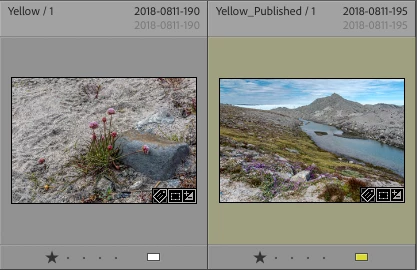
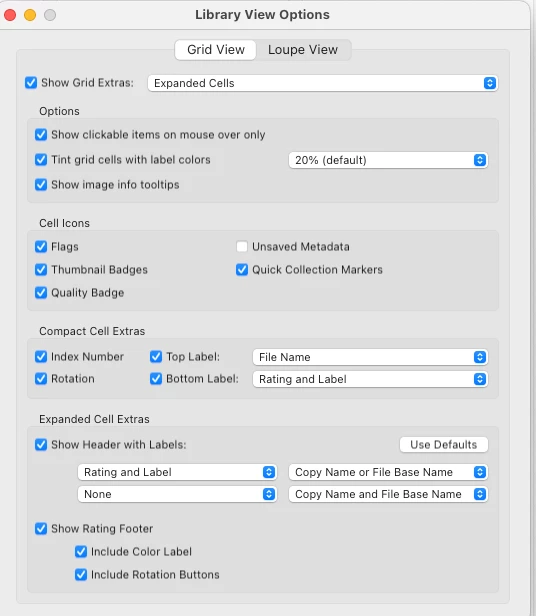
Since the update to LR 15, I am having a frustrating problem with grid view, where tint grid cells with label colors is no longer working for items that were previously tinted. Instead in the upper left corner of each of the image grid windows, it will say “[Color label name]/[number of stars]” in the upper left corner. For example if I had it labeled red with 3 stars it will say “Red/3,” and if it is yellow with one star it will say “Yellow/1.” The stars do show up with the image, as do the flags, but not the color tint. I can add the tint by selecting the image and tapping the associated color number. For example, I select images that have Yellow in the upper corner and tap the 7 key and it adds the tint and changes the text to “Yellow_Published” which is a nice idea to include the word “Published” which is what Yellow signifies to me. The screenshot of grid view attached shows what all the images look like now (left) and what happens if I hit the 7 key (right). But I have tens of thousands of images in my catalog. I can’t go back and spend the time to fix all of them!
This is causing me major headaches right now in my professional work, slowing me down considerably in getting materials to a client.
Note that I have tried the following:
• Making sure the View Option is checked to show the color tint of 20%. (see screenshot)
• Updating to the latest version — Lightroom 15.2
Other specs: M3 Mac running OS 15.7.3
Please help!
—HG
 AdChoices