

Grouping presets
Hi,
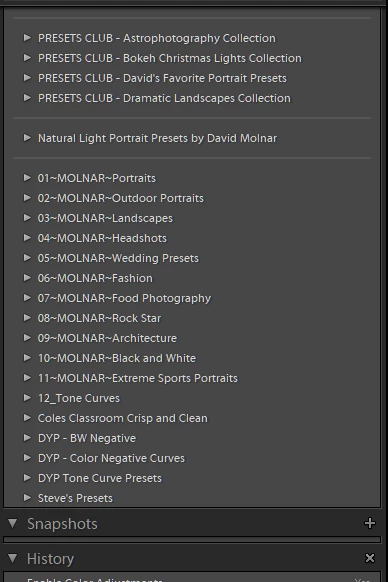
I need to know how to get develop presets in Lightroom clustered together in the preset panel.
After a lot of examining of the .xmp files, I notice the .xmp files that are grouped contain a line of code
crs:Cluster="#01 PRESETS CLUB".
This appears to group presets with the same cluster name together. If I remove the text between the quotation marks in an .xmp file the relevant file is not grouped or clustered.
To modify this line in all my presets would take time.
I am using both presets I have created myself and presets I have purchased.
The independent developers must have a way of doing this quickly or have special s/w which allows them to create the .xmp files with this info. Further testing indicates that this data in the cluster line must be in upper case otherwise it won't work and will in fact corrupts the preset panel.
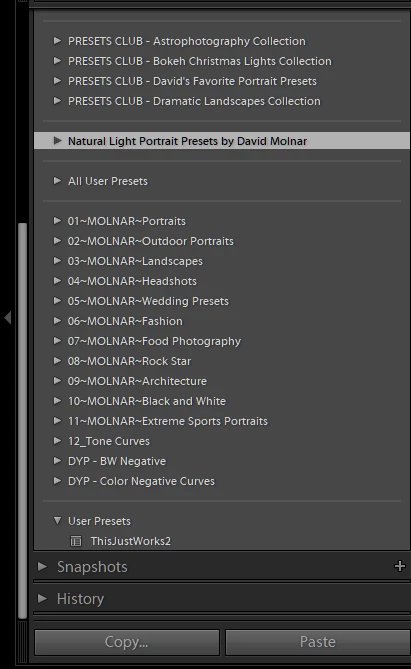
If you look at the two screen shots I have attached it will explain it better. Note there are a couple of presets that are clustered and some are not. There must be a way of doing this.
However, after changing the line in a number of .xmp files, after import they appear in the all user presets group which then can't be renamed!
Hope I have made myself clear.
Regards,
Steve
{Moved from Lightroom Cloud to Lightroom Classic Forum by Moderator}


 AdChoices