
Known Participant
December 24, 2023
Answered

Happy holidays and a question

  • December 24, 2023
  • 2 replies
  • 460 views

I've realized that possessing 16 2 TB SSD external drives is getting extreme. I could free up a lot of space if I could remove my commercial work and jobs that I finished with onto one hard drive verify, freeing up a bunch of space. I also need to do a lot of culling. I have an album from Alaska 2 years ago where I took 5000 photos and only looked at about half of them. lol

Anyway, I want to take specific folders from specific hard drives and put them all into one drive, freeing up Tons of space! What is the safest way of doing this?
This topic has been closed for replies.
Correct answer Sean McCormack


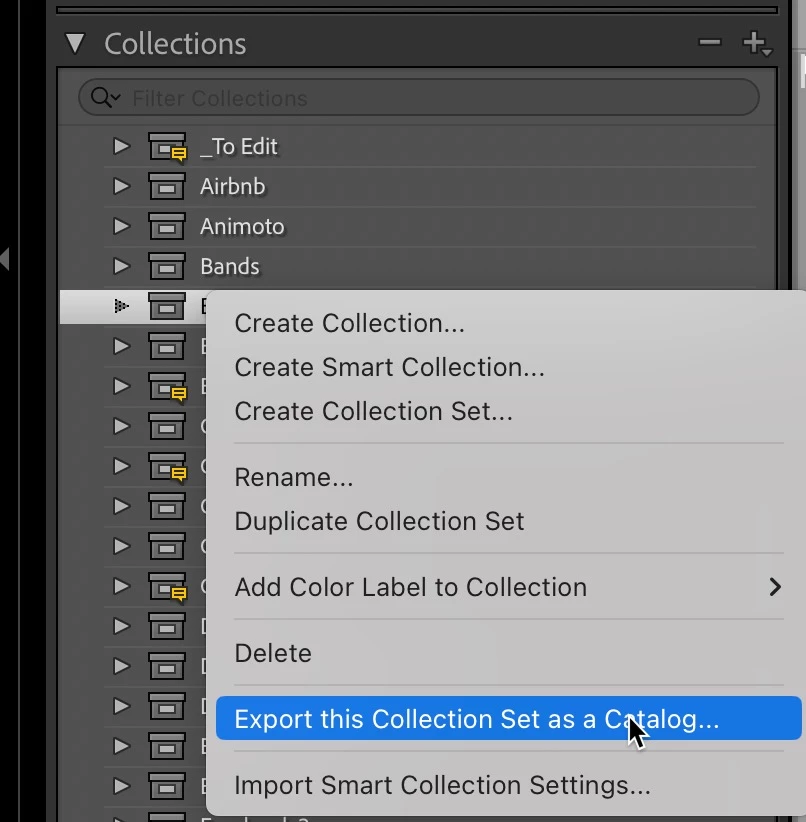
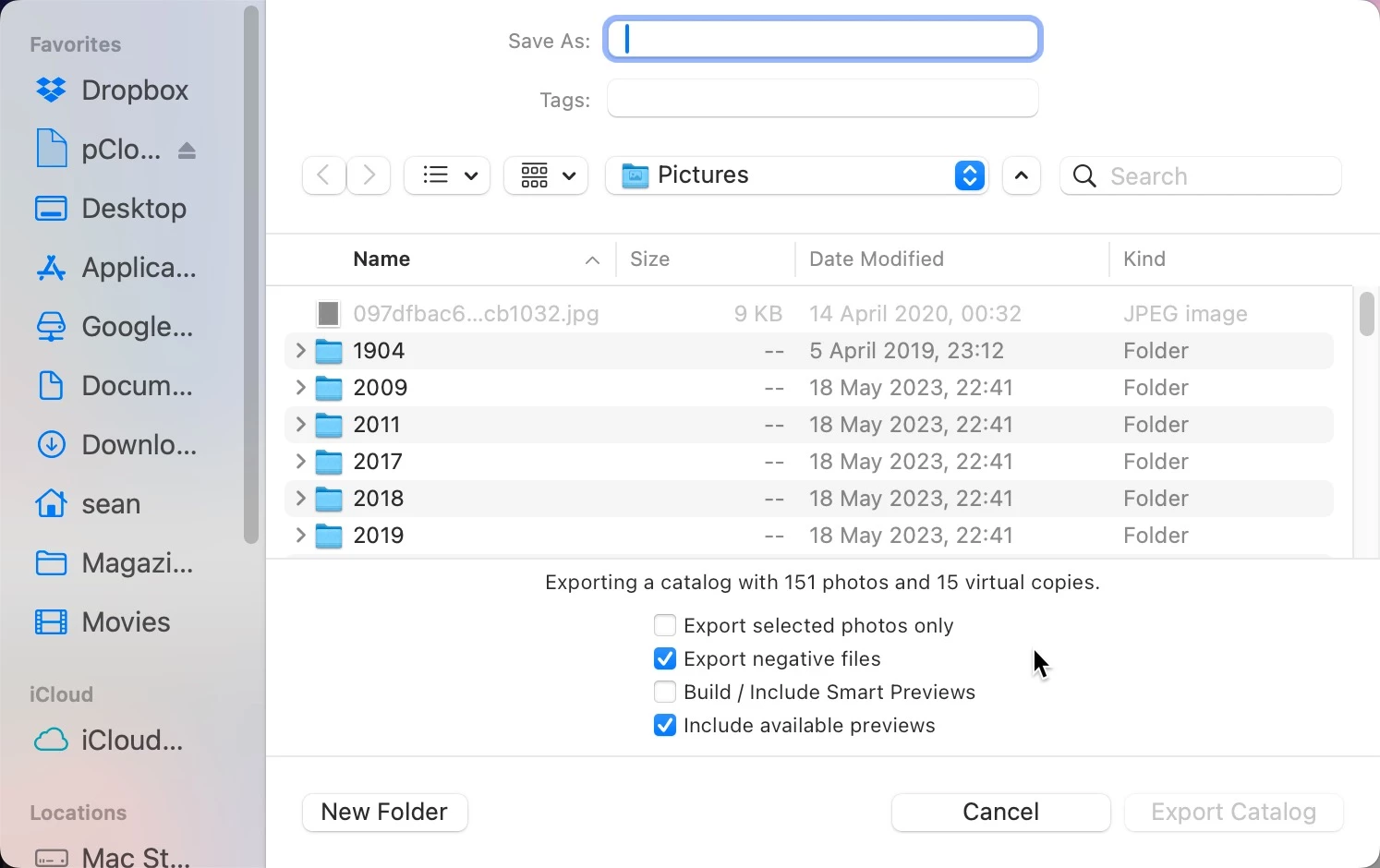
There are numerous ways to do it. Create a collection set and then create collections of similar files (Client collections for example). When the entire set you'd like to have as your standalone commercial catalog is in the collections, Right Click on the Collection Set and from the menu choose Export the Collection Set as a Catalog. Because this will be standalone, make sure to have Export Negative Files on. 


Once the catalog is finished, you can delete the files from the main catalog, and others that you would have culled as part of creating the collection set. 


To consolidate further, start bringing files together into as few drives as possible within Lightroom (unless you're familiar with Find Missing Folder or Update Folder Location. Remember to leave some space on each drive for edting etc. 

2 replies

KR Seals
Community Expert
Community Expert
December 30, 2023

Are you on Windows or Mac OS? Which version of the operating system?


Ken Seals - Nikon Z 9, Z 8, 14mm-800mm. Computer Win 11 Pro, I7-14700K, 64GB, RTX3070TI. Travel machine: 2021 MacBook Pro M1 MAX 64GB. All Adobe apps.
Known Participant
December 30, 2023

I figured it out, but I am currently running, a brand new out of the box 48 hours ago MacBook Pro with the M3 pro chip 18 GB of RAM. I have a side question.I was able to successfully transfer the catalogs, and when I made sure they were on the new drive, I deleted 2000+ images from my hard drive, but it didn't free up very much space. One thing I noticed when I plugged my hard drive in it still has LRC version 12 on it. Should I delete that I clicked on it and it asked me if I wanted it to make it my new catalog and I immediately backed out.

Sean McCormack
Community Expert
Community Expert
December 31, 2023

You need to empty the trash to see the space free up. 


You really should just have Lightroom Classic 13. 12 is asking that question because it didn't find a catalog at the default location in Pictures. I wouldn't be in a hurry to delete catalogs from Lightroom Classic 12 until you know you've all the settings and metadata in Lightroom Classic 13 somewhere.

Sean McCormack. Author of 'Essential Development 3'. Magazine Writer. Former Official Fuji X-Photographer.
Sean McCormack
Community Expert
Sean McCormackCommunity ExpertCorrect answer
Community Expert
December 24, 2023


There are numerous ways to do it. Create a collection set and then create collections of similar files (Client collections for example). When the entire set you'd like to have as your standalone commercial catalog is in the collections, Right Click on the Collection Set and from the menu choose Export the Collection Set as a Catalog. Because this will be standalone, make sure to have Export Negative Files on. 


Once the catalog is finished, you can delete the files from the main catalog, and others that you would have culled as part of creating the collection set. 


To consolidate further, start bringing files together into as few drives as possible within Lightroom (unless you're familiar with Find Missing Folder or Update Folder Location. Remember to leave some space on each drive for edting etc. 

Sean McCormack. Author of 'Essential Development 3'. Magazine Writer. Former Official Fuji X-Photographer.
Known Participant
December 30, 2023

So I just got in formatted the hard drive I want to store all the images on, but it won't let me do so when I click on So I just got in formatted the hard drive I want to store all the images on, but it won't let me do so when I click on export as a catalog"export as a catalog" it won't let me select the drive, but everything else is grayed out. Thoughts?