
Inspiring
December 17, 2016
Answered

Having no luck with Canon 5D Mark IV tethered shooting in Lightroom CC 2015.8

  • December 17, 2016
  • 8 replies
  • 15911 views

Having no luck with Canon 5D Mark IV tethered shooting in Lightroom CC.

The support page lists the camera as being supported for tethering. Lightroom sees the camera, it comes up as Canon 5D Mark IV, the camera is on and USB cable is connected, click the LR shutter button, nothing happens.

Tethered shooting works fine in Canon EOS Utility 3.

I followed all Adobe's support page instructions for troubleshooting. Removed preferences file, restarted lightroom cc.
Behaves the same.

Maybe I am doing something wrong or maybe there are some bugs in the support for the 5D Mark IV tethered support in LR CC. I had used my 6D tethered in LR 5, I know how it is supposed to work. Any suggestions?

I have talked to someone who has it working with Windows 10.

I am running Windows 8.1 with latest updates.
Adobe Lightroom CC 2015.8 release.


Lightroom sees the camera, just does not see the settings and does not release the shutter when pushing the shutter button. If I pull the USB cable it sees the camera is gone. Really puzzled.

I still have Adobe Lightroom 5.7 64Bit installed on my machine alongside of Lightroom CC 2015.8, but I am trying this with Lightroom CC 2015.8.

I have gone into my preferences folder and removed the preferences files and restarted Lightroom CC 2015.8.

Lightroom sees the camera, just does not see the settings and does not release the shutter when pushing the shutter button. If I pull the USB cable it sees the camera is gone.

I have tried it with memory cards and without memory cards.

This is my screen with the camera connected, you can see LR sees the camera.
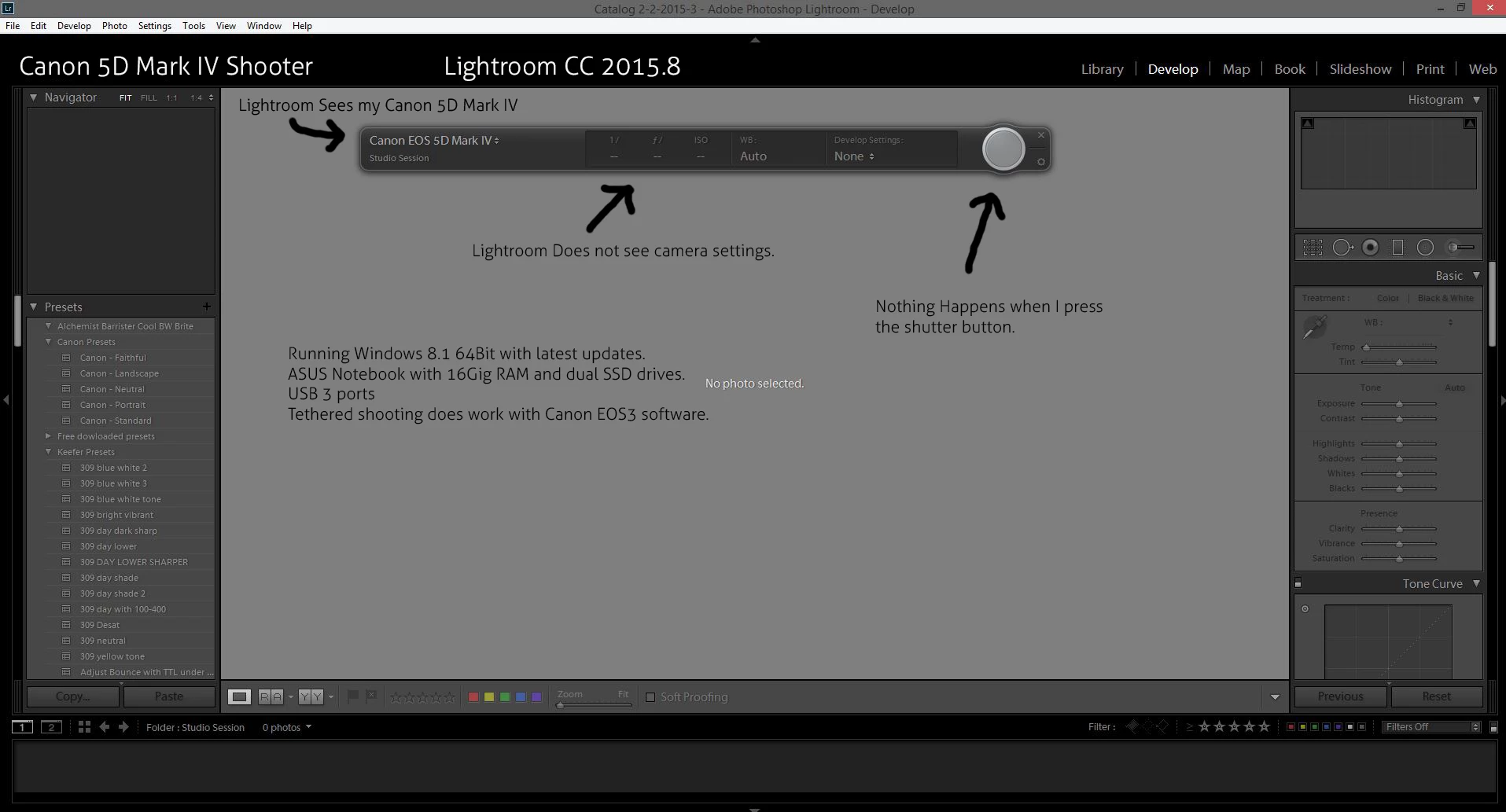
Hoping the techs here can help me resolve this.

    This topic has been closed for replies.
    Correct answer BKKDon

    I tried so many things, just in last 10 minutes...tried to get EOS Utility 3 preference to send remote shooting to LR, it is not even detecting the camera now in LR, set EOS Utility 3 back to Digital Photo Professional, but now LR doesn't even detect the camera.

    I don't know if the EOS Utility 3 is interfering  with LR, how do other people get around that?


    Yes you are right about the EOS Utility interfering with Lightroom, as I normally use Capture One Pro and I don't have any issues I switched to Lightroom and found that I had to kill the EOS utility by clicking on the icon on the taskbar and selecting exit or you may want to kill the process using the Process Manager.

    Selecting 'do not start the EOS Utility automatically when a camera is connected' doesn't help because of the components in memory.

    The other way you can do it is to use a 'watched folder' and use the EOS Utility rather than the Lightroom tethered capture.

    8 replies

    TheCuban
    Participant
    January 30, 2018

    what happe to me is....first for windos you have to uninstall every software for EOS, then just wait because the issues is not LR is windows, I tried in my 2010 Mac Pro and works just perfect like plug and play so I gues windows need and update or canon needs and update for windows no LR.>....

    Participant
    January 12, 2022

    Jan 2022 Update:

    New MacBook Pro, OSMontery 12.1 + LightRoom Classic (not CC) 11.1 +  Canon 5D mk IV.

    "CAN'T FIND CAMERA" for almost 2 days of frustration.

    Thanks to the above posts over the years - I made a connection for now. (BTW, camera had worked in LR6 + OS10.) 


    Try this - seems to jumpstart the first hookup:

    • Fresh boot and open LRc.

    • Remove card(s)

    • FTP off  and WiFi off

    • Turn ON enable without card

    • Attach tether cord, then Tether Capture in LRc files menu - camera and computer have made contact! Images on computer, but not camera back.

    • Put card in camera

    • Turn OFF enable without card.

    If necessary, Tether Capture again - I got RAW images on both compter and camera back!

    It appears the tether connection works without all the above now. Just plug in and turn on and tether.

    Participant
    January 12, 2022

    (See above) Also, I have never loaded Canon software to my computers since I switched to LightRoom.

    Participant
    September 15, 2017

    I have also still problems to tethering in LR with Canon 5D mark IV !!!

    My setup:

    iMac 2017 Sierra (up2date)

    Lightroom CC (up2dae)

    Canon 5d mark IV (up2date)

    Original USB 3.0 cable

    Canon Utility 3

    Issue:

    Blinking computer symbol at the camera screen. (connect - disconnect - connect...)

    Try troubleshoots :

    1) Fix tethered shooting in Lightroom

    2) Disable FTP and wireless in the camera settings

    3) Applications/Canon Utilities/EOS Utility/EU3/EOS Utility 3.app/Contents/Frameworks/EDSDK.framework/Versions/A

    Copy the contents of folder A and paste in Applications/Adobe Lightroom/Adobe Lightroom.app/Contents/PlugIns/tether-canon-plugin.lrplugin/Contents/PlugIns/tether-canon.app/Contents/Frameworks/EDSDK.framework/Versions/A

    4) Tethering only in Canon Utiltiy 3 and Capture One 10 works fine and fast

    5) workaround with "watched folder" and Utility 3 is very slow?

    6) with formated CF/SD and without

    7) Testing tethering with my old Canon 5d mark III, no problem!

    @Adobe, you know the issue, please fix it!

    Participant
    October 28, 2017

    I FIGURED IT OUT. Go to Task Manager and kill anything that says "EOS". That fixed the problem immediately.

    info@studiohaaglanden.nl
    Participating Frequently
    August 23, 2017

    I found two solutions/workarounds.

    They work both with Tethered shooting in Lightroom and with the canon utility app. Pity Canon has not published or informed users about this themselves. It would have saved a lot of frustration and time.

    Option 1. remove the memory cards. In lightroom sometimes you can replace one card after the camera has been detected but it is unreliable.

    Disadvantage is that you cannot use the preview on the camera screen. You nee to wait until the image is displayed on the computer screen.

    In my case it worked in both Lightroom and Canon Utility with monitored folder in Lightroom. (little slower)

    Option 2. Disable TFP settings in the camera. After disabeling TFP settings tethering worked as expected in both Lightroom and canon Utilities 3.  In this situation there is no need to remove the memory cards and he preview on the camera screen is available. Images are stored on both the computer and te memory card.

    Participant
    August 6, 2017

    I just stumbled upon the solution from something mentioned in this thread. Lightroom tether works if you have no memory card in the camera (obviously pointless)... but... if, once it has found the camera without the memory card , you then replace the memory card into the switched on camera (after a few seconds of losing it again) it re-finds the camera with the memory card replaced and you remain tethered. This is a buggy glitch that has been the bain of my life for ages as I must have inadvertently done this before as I have had it work a few times previously after lots of messing around Without knowing what I did to make it work.

    BKKDon
    Inspiring
    August 6, 2017

    Have you tried setting release shutter without card to enable ... not sure about LR but EOS Utilities works with this setting and no card.

    info@studiohaaglanden.nl
    Participating Frequently
    August 13, 2017

    I have the samen issue with the Cano D5 mkiv. Tethering simply does nog work on either Lightroom or Canon utility.
    But I found that removing bothe memory cards solves the problem. With no memory cards in the camera for the firsttime I managed to comple a day's shooting Tethered without any problems. However, there are some issues. For example, the quick preview on the camera screen is not available. I often use it at after I made some changes, to check the histogram.
    Also it takes a little time for the images to be displayed on the computer screen. Several seconds. (depending on the resolution you set your images.

    But at least is seems to work. Hopefully A permanent solution will be available soon.

    info@studiohaaglanden.nl
    Participating Frequently
    July 27, 2017

    I have the same problem. Lightroom recognises the camera, (EOS utility diabled) but as soon as I take a picture it seems to work but nothing happens. The camera is disbaled, nothing works. Ik looks as if the image is being transferred but nothing is downloaded. It doens't mattier if I use a special active tether cable of the short USB cable that came with the camera.

    The same problem happens with the EOS utility. I manage to use it only once.
    Mijn Canon 5d MK III works fine !!

    So far no help from Canon, hopelfully some help here of from Adobe.

    Participant
    June 29, 2017

    Hey man,

    So I've been struggling with this for a while now, and also battling with EOS Utilities losing connection all the f****ing time, so I tried shooting without memory cards in the camera and hey presto, everything works. EOS Utilities doesn't crash. LR tethering works perfectly. But it kinda defeats the point of shooting to memory cards as well for redundancy sakes.


    I'm actually gonna see if my mkII has this same issue when I get a chance, but anyway. There's a sort of solution

    Participant
    June 29, 2017

    Looks like the mkII works fine with a card in. No problems. Weird....

    Inspiring
    May 12, 2017

    Tethered shooting with Canon 5d M IV

    I seem to have a similar problem.

    I have a updated Lightroom CC

    Canon 5d M IV

    Tethered shooting works if I shoot Jpg but not even a small RAW

    I took Canon EOS utility off as it was interfering with things.

    I have revisited this problem for months now expecting each new update to fix this problem but nothing yet.

    Any help anywhere?

    BKKDon
    Inspiring
    December 17, 2016

    Do you have a memory card in the camera?

    Inspiring
    December 17, 2016

    Yes two of them, CF and SD

    Inspiring
    December 17, 2016

    Also camera set to record both RAW and JPEG.