
Participating Frequently
August 19, 2025
Answered

Help finding Folders moved outside of LR application

  • August 19, 2025
  • 1 reply
  • 988 views

Hello
A friend has had to resurrect/salvage many years of my old image files from older non-functioning external hard drives  for me
They are now on a new 4 TB drive
My LR Catalogue has always remained on my  MacBook Pro laptop (running Sequoia 15.6 & LR Classic version 14.5)
As these folders were moved outside of the LR environment, the images are no longer found/visible to LR
I know I have to now 'point' LR to these files, but I am not tech savvy and finding it all very overwhelming
Any advice /direction in a simplified step/language form would be much appreciated . . .
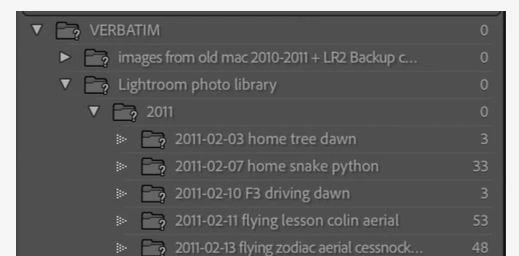
Below is an example of what i can see if this is any help??
Correct answer Rob_Cullen

Known facts-

1)  Lr-Classic believes folders with a [?] are on a Verbatim Drive  eg. {2011} 

2) YOU know where there is a {2011} folder  (I cannot make out its location from your screenclips)


The method to relink is to-

a)  [Right-Click] on the missing folder in the Lr-Classic folder panel (eg. ? 2011 ) and

b) Choose [Find Missing Folder]  

c) Use Mac Finder to locate the {2011} folder where YOU know it to be (eg. different drive name). (This relinks the 2011 folder & its sub-folders)


If your photo library and all its sub-folders was restored in exactly the same heirarchy of folders and files under the Parent folder {Lightroom photo Library} then relinking this folder will be even easier, the sub-folders will re-link with the parent.

If you don't have the same exact heirarchy of folders/sub-folders/files, then you have a major task ahead of you.  😞

Read these articles:

MISSING FILES AND FOLDERS-(Computer Darkroom)

MISSING FILES & FOLDERS (Lightroom Queen)


1 reply

Rob_Cullen
Community Expert
Rob_CullenCommunity ExpertCorrect answer
Community Expert
August 20, 2025

Known facts-

1)  Lr-Classic believes folders with a [?] are on a Verbatim Drive  eg. {2011} 

2) YOU know where there is a {2011} folder  (I cannot make out its location from your screenclips)


The method to relink is to-

a)  [Right-Click] on the missing folder in the Lr-Classic folder panel (eg. ? 2011 ) and

b) Choose [Find Missing Folder]  

c) Use Mac Finder to locate the {2011} folder where YOU know it to be (eg. different drive name). (This relinks the 2011 folder & its sub-folders)


If your photo library and all its sub-folders was restored in exactly the same heirarchy of folders and files under the Parent folder {Lightroom photo Library} then relinking this folder will be even easier, the sub-folders will re-link with the parent.

If you don't have the same exact heirarchy of folders/sub-folders/files, then you have a major task ahead of you.  😞

Read these articles:

MISSING FILES AND FOLDERS-(Computer Darkroom)

MISSING FILES & FOLDERS (Lightroom Queen)


Regards. My System: Windows-11, Lightroom-Classic 15.1.1, Photoshop 27.3.1, ACR 18.1.1, Lightroom 9.0, Lr-iOS 10.4.0, Bridge 16.0.2 .
annems1Author
Participating Frequently
August 21, 2025

Thankyou so much Rob!
I will check out the links and have a go over the weekend
The hierarchy of my folders and sub folders were all kept as original so fingers crossed the simpler option works out for me
😆🤞🤞🤞