
Inspiring
February 29, 2024
Answered

Help me clean up my LRC catalog

  • February 29, 2024
  • 1 reply
  • 439 views

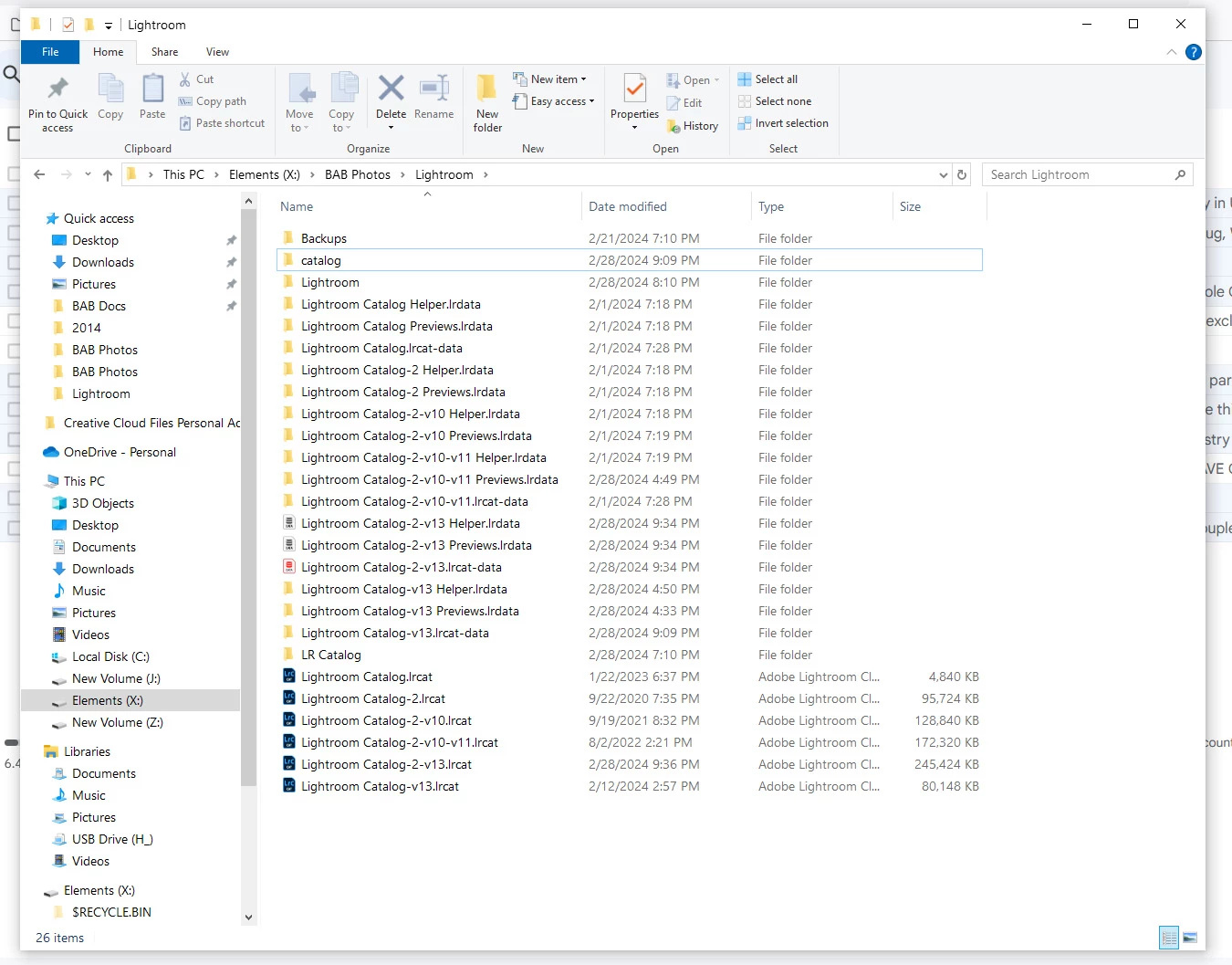
I asked this question a few months ago but never got around to deleting anything from the LRC catalog, as the catalog is LRC and it's DAM properties, so I was afraid to do so.  I'm needing to load a new computer soon and noticed there seem to be multiple duplicates in the current catalog.  Kindly indicate what is no longer necessary and I'll trim it this time.  Thanks!
This topic has been closed for replies.
Correct answer bruceb76700895

Thank you.  The LRC catalog is regularly backed up in a folder that is contained with current photos; and that is backed up once a week to a separate drive stored out of my home.  Is that sufficient?


The reason I haven't deleted anything beyond v13 is that everything appears to be duplicated.  I.e., there are catalogs with a blue LR heading and catalogs without listed above the blue ones.  If you can understand my unscientific description.  Which need to remain in the transfer to new computer.  Sorry if I seem to be wasting your time.  Thanks again.

1 reply

Community Expert
February 29, 2024

Assuming you have a single working Catalog at any given time: that Catalog and all the support folders that show the same naming as that, are all you need to transfer to the new computer. As well as the imported files of course, if living in an internal drive.


Catalogs are automatically duplicated fresh whenever a new major software version requires database conversion. Each time the new copy you go forward with, shows that new LR version's number in its naming by default.


IOW, the ones with names ending "-v13" seem to be current for version 13 and the rest are likely disposable.


That is: presuming you have been retaining some  periodic Catalog backups separately, and going back far enough, to protect you against any issues that could have arisen and thereafter lurked undetected within your more recent v13 setup. 

Community Expert
February 29, 2024

As a tip: I notice there is a "Backups" folder included. If that is where your Catalog backups are being automatically saved when you opt to allow this on exiting LrC: this would make your backups equally vulnerable to a hard disk issue as the Catalog that is being backed up. Best practice is to direct the Backups to a physically separate location instead, or at the least to include these local Backups in very regular syncing or disk backup to some other physically independent target location. Otherwise they are not really protecting your work to the fullest. That's besides backing up all the imported files elsewhere, need not be said.

bruceb76700895AuthorCorrect answer
Inspiring
February 29, 2024

Thank you.  The LRC catalog is regularly backed up in a folder that is contained with current photos; and that is backed up once a week to a separate drive stored out of my home.  Is that sufficient?


The reason I haven't deleted anything beyond v13 is that everything appears to be duplicated.  I.e., there are catalogs with a blue LR heading and catalogs without listed above the blue ones.  If you can understand my unscientific description.  Which need to remain in the transfer to new computer.  Sorry if I seem to be wasting your time.  Thanks again.