
Participant
July 6, 2026
Question

Help with accessing photos after transfering files to a new hard drive

  • July 6, 2026
  • 2 replies
  • 27 views

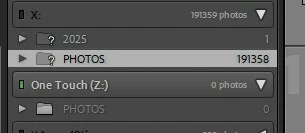
I was close to running out of space on my hard drive (“X”) so I transferred > 190,000 photos and the Lightroom Classic to a new hard drive, which has a different letter (“Z”). I did this using Windows Explorer instead of within Lightroom as I understood it was quicker and more reliable to use this approach. I then disconnected the old hard drive (“X”) to ensure all access to Lightroom was via the new hard drive. I am able to open the catalog in Lightroom but the folder structure does not appear. The Photos folder is on the hard drive but I can’t get the software to recognize it. It is my understanding that I shoud not use “synchronize” since I would lose all past edits. Is that correct? I also read about using the “Find the Folder” function but I don’t see that option anywhere. 

How can I get Lightroom Classic to recognize the photos that are stored on the hard drive and hopefully not lose the edits that are already incorporated in the catalog?
 

    2 replies

    dj_paige
    Legend
    July 6, 2026

    It does show your folder structure. It is still under X. So you have to point Lightroom Classic to the new location of the files. Here are complete instructions with screen captures, in particular see Figure 4 and associated text.

    dj_paige
    Legend
    July 6, 2026

    Alternatively, if you change the letter of your Z drive to X, that solves the problem too, and can be much simpler than telling LrC to look on the Z drive, as everything works when you change the letter of the drive back to Z.

    Participant
    July 7, 2026

    Thanks!! This worked. 

    Conrad_C
    Community Expert
    Community Expert
    July 6, 2026

    I also read about using the “Find the Folder” function but I don’t see that option anywhere.


    It’s unfortunate that Adobe does not show that command on the normal menus on the menu bar. For that reason, it’s not easy for users to discover. You have to know where to look. 


    The actual command is Find Missing Folder (or Update Folder Location), and the only place you will find it is by right-clicking the folder. Do that so you can show Lightroom Classic where that folder went.