
Highlight Clipping Warning Thresholds
Hi all,
I am experiencing behaviour I did not expect in LR Classic CC.
I am shooting products on a white background and use the highlight clipping warning to indicate when the background has blown to pure white (i.e. I want to achieve a pure white background).
I've edited a large number of images and ensured that for each the clipping warning is showing over the entire background. However on export to JPG I have noticed that certain areas of the background appear off-white (highly noticeable at the edge of images when images are exported to a pure white contact sheet for instance).
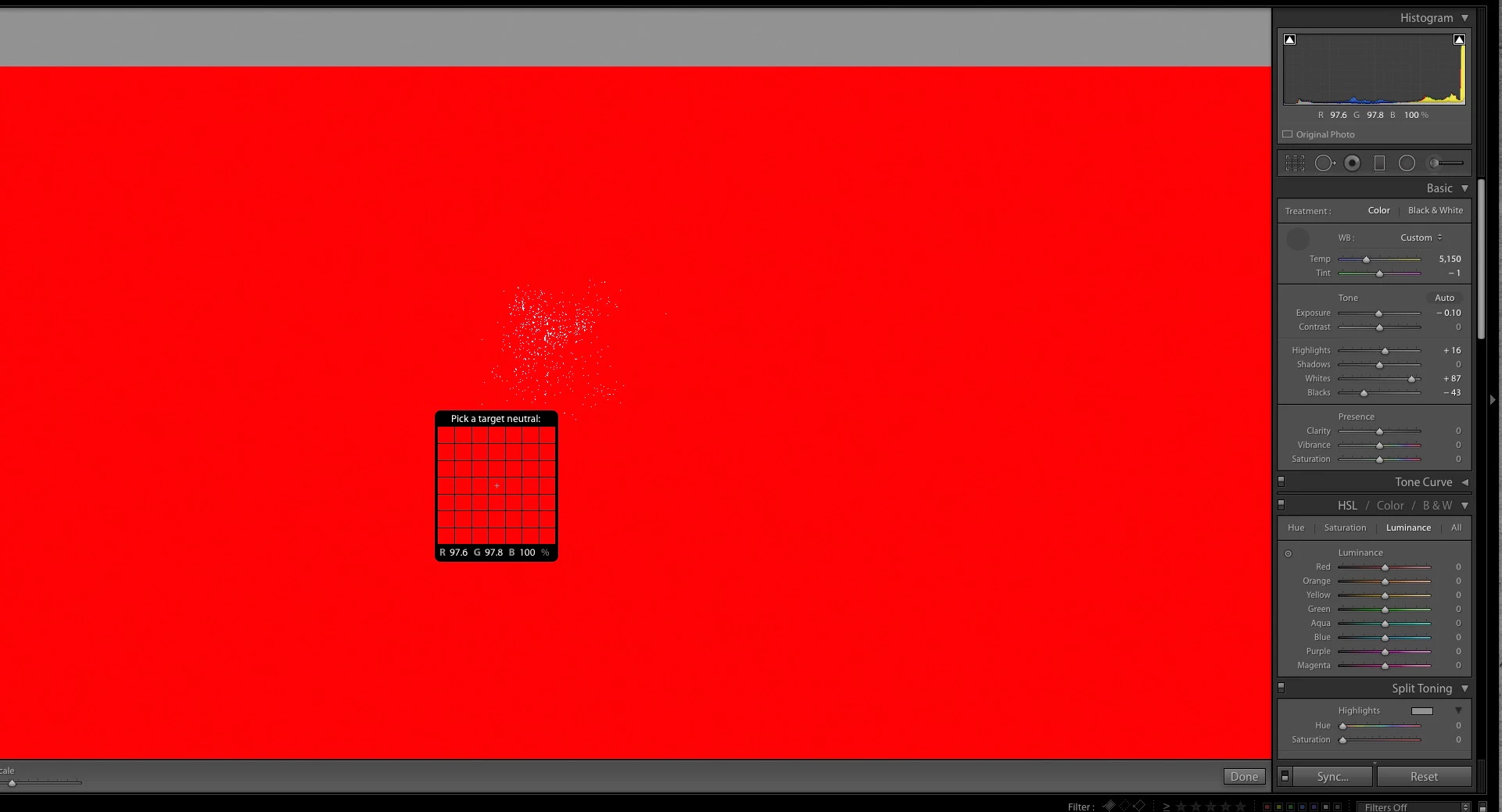
Further investigations in LR have shown that there is indeed detail in these areas with typical RGB values showing as 97, 97, 100 but the clipping warning is present.
So, am I to assume that the clipping warning kicks in when ANY RGB channel reaches 100 rather than all of them?
If so this is not helpful when shooting on white background since how can I tell that an area is in fact pure white? I notice that holding 'ALT" and adjusting individual exposure/highlight sliders (for example) does give a more representative result, but this is somewhat cumbersome when editing large numbers of images (I am shooting product 360s).
Any help or advise greatly appreciated. Screen shot below shows what I am experiencing, this is a section of background with highlight clipping warning turned on showing RGB values.
Thanks,
John
 AdChoices