Known Participant
August 30, 2024
Answered

How can I create a smart collection of Pixel Shift images ?

  • August 30, 2024
  • 2 replies
  • 1689 views

For the last 6 years, I have been the owner of a Pentax K-1 II DSLR .

When I use the Pixel Shift feature, it records 4 images in a single DNG file.

LRc is able to process these files and combine the 4 exposures, as long as there is no motion.

If there is motion, it is preferable to use an external processor such as Pentax Digital camera utility or RawTherapee.


My problem is that I don't see any way to distinguish which images in my catalog are Pixel Shift, and which are not. I can filter by camera model and file format (I only shoot in DNG anyway), but that does not narrow it down enough.


I checked the metadata of one of my PixelShift files using exiftool. It showed the following field :


[Pentax]        Quality                         : RAW (pixel shift enabled)

Is there any way to create a smart collection that filters based on this metadata ?

I  checked using "all plug-in metadata" for the word "shift" and it didn't match any photo.

This topic has been closed for replies.
Correct answer johnrellis

[This post contains formatting and embedded images that don't appear in email. View the post in your Web browser.]


@madbrain76


The Any Filter documentation only lists explicitly fields from the catalog that LR directly supports. But Any Filter also lets you search any of the thousands of additional fields returned by Exiftool. 


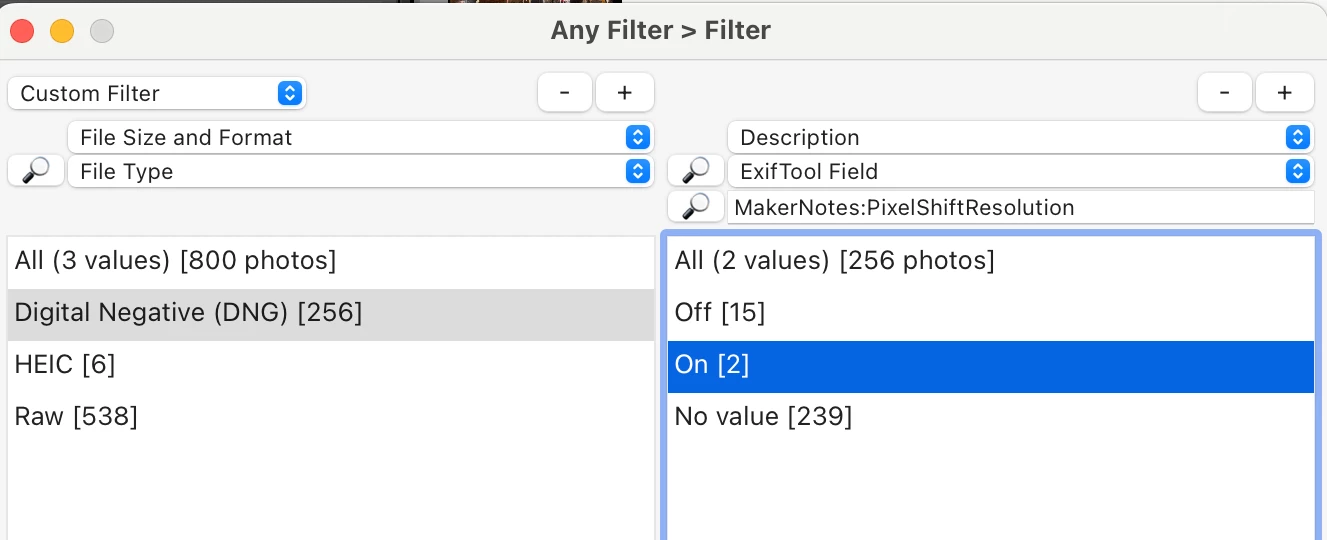
The field you're interested in is stored in the manufacturer-specific MakerNotes:PixelShiftResolution, and you can search for it with Any Filter's ExifTool Field criterion:


(Tip: Click the magnifying glass   to search for field names quickly.)


Since ExifTool can only search about 100 - 200 photos/sec, you can speed up Any Filter's searching of ExifTool Field considerably by restricting the search to a smaller set of photos, e.g. by using the File Type criterion.


Another tip: When using ExifTool to poke around inside a photo, use the options "-a -G".  The -a option will show all the fields from different metadata sections that happen to have the same name, and -G will prefix the name with the metadata section it's coming from, e.g. MakerNotes or EXIF.


2 replies

Legend
August 30, 2024

If Anyfilter doesn't work, you could use EXIFTool to search for that tag and write a keyword that could be searched and filtered with Lightroom.

Known Participant
August 30, 2024

Yes, I thought of that, but it's a bit of a pain. If I did that, I would at least want to be able to trigger it for each import, to run it only on newly imported files. I don't see a way to call an external process at import time in LRc, though.

There is also the question of where to store the keywords and how to get LRc to pick up the metadata changes without messing things up, like existing LRc edits.


Pentax K-1 II . Panasonic Lumix GX85.i7-5820k OC 4.3 GHz32GB DDR4-26668x1 TB striped SSDnVidia GTX 9602 x 32UHD59-B 32" 4K displays1 x Asus PB238Q HD display10Gbe Ethernet112TB NAS
Legend
August 30, 2024

There are some easy ways to use EXIFTool with Lightroom but yes if you can get this in a plugin, so much the better. I'm amazed that someone hasn't integrated the two.

Ian Lyons
Community Expert
Community Expert
August 30, 2024

Have a look at Anyfilter by @johnrellis It's a Lightroom Classic plugin that may do what you're looking for. I've tagged this post for John's attention.


https://johnrellis.com/lightroom/anyfilter-criteria.htm

Known Participant
August 30, 2024

Ian,


Thanks. I checked out AnyFilter. It doesn't appear to allow searching for that specific metadata information yet. I e-mailed John to inquire if I missed something.

Pentax K-1 II . Panasonic Lumix GX85.i7-5820k OC 4.3 GHz32GB DDR4-26668x1 TB striped SSDnVidia GTX 9602 x 32UHD59-B 32" 4K displays1 x Asus PB238Q HD display10Gbe Ethernet112TB NAS
Ian Lyons
Community Expert
Community Expert
August 30, 2024

John partcipates on this forum. I'm sure he will followup your email or here on the forum.