Participant
June 18, 2020
Answered

How can i deactivate the automatic creation of virtual copies?

  • June 18, 2020
  • 4 replies
  • 1358 views

Every time i click on an image in Lightroom classic 9.3 (newest version) it automatically creates a virtual copie of the image.(I think they call it proof copie) How can i turn that off ? 

Thanks for Help!
This topic has been closed for replies.
Correct answer Bob Somrak

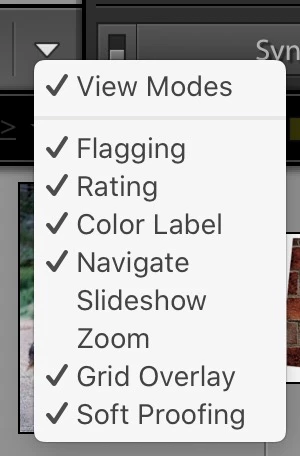
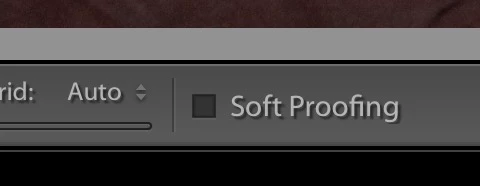
You probably hit the S key to turn soft proofing ON.  Either hit S again in Develop Loupe View or click the button on the toolbar if you have the button set to show up.


4 replies

Participating Frequently
September 2, 2020

Yeah!  I found my answer....Thanks

Participant
June 18, 2020

Thank you! Problem solved 

Ian Lyons
Community Expert
Community Expert
June 18, 2020

I suspect your preference file may be corrupt as Lightroom Classic doesn't auto create VCs when an image is clicked. To reset the preference file, follow instructions for Method 1 in linked document https://helpx.adobe.com/lightroom-classic/help/setting-preferences-lightroom.html

Bob Somrak
Legend
June 18, 2020

I think it will Auto Create a Proof Copy if you have the Soft Proof button checked and do and edit if you have ever checked the "Dont Show Again" in the following dialog.  I didnt want to try to check the Dont Show Again as I always want the dialog to show.


M4 Pro Mac Mini. 48GB
Bob Somrak
Bob SomrakCorrect answer
Legend
June 18, 2020

You probably hit the S key to turn soft proofing ON.  Either hit S again in Develop Loupe View or click the button on the toolbar if you have the button set to show up.


M4 Pro Mac Mini. 48GB