Known Participant
July 19, 2023
Answered

How come I don't have a Presets panel?

  • July 19, 2023
  • 2 replies
  • 385 views

I just read that Lightroom Classic comes with some built in presets, but I don't see a Presets panel on the left hand side when I'm in the develop module. How do I access teh presets? Total newbie here, so talk to me like I know nothing. THanks!

This topic has been closed for replies.
Correct answer Rob_Cullen

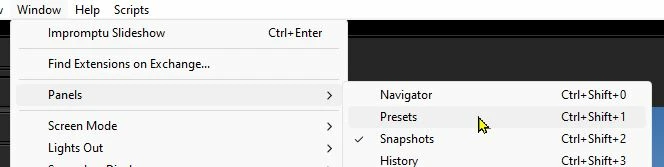
a) Go MENU: Window > Panels > Presets  and click to toggle 'on'

b) Or, Press [Ctrl + Shift + 1]

c) Or, [Right-Click] on one of the other header lines (eg. History) and check 'Presets' from the list.


2 replies

John Waller
Community Expert
Community Expert
July 19, 2023

What @Rob_Cullen said.


Also right-clicking anywhere inside that dark grey area on the left will bring up the context menu where you can set the Presets panel to appear by left clicking on it.


Right-clicking on most panels in Lightroom Classic will bring up a context menu where you can toggle various panels to be visible or hidden.

Rob_Cullen
Community Expert
Rob_CullenCommunity ExpertCorrect answer
Community Expert
July 19, 2023

a) Go MENU: Window > Panels > Presets  and click to toggle 'on'

b) Or, Press [Ctrl + Shift + 1]

c) Or, [Right-Click] on one of the other header lines (eg. History) and check 'Presets' from the list.


Regards. My System: Windows-11, Lightroom-Classic 15.1.1, Photoshop 27.3.1, ACR 18.1.1, Lightroom 9.0, Lr-iOS 10.4.0, Bridge 16.0.2 .
Known Participant
July 19, 2023

Thanks!
