Answered
How do I edit a file name in lr6?
All I want to do is change a word in the middle of the filename - have tried both library & develop modules so far. OSX on Mac
All I want to do is change a word in the middle of the filename - have tried both library & develop modules so far. OSX on Mac
That would be the File Name entry of the Metadata section of the right hand panel of the Library module.
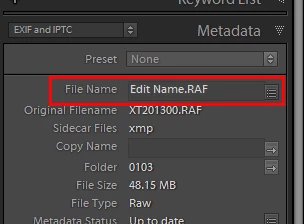
Just click in the File Name and type in the new name. Make sure you include the same extension as the original file.
You can also Batch Rename by click the button to the right.
Already have an account? Login
Enter your E-mail address. We'll send you an e-mail with instructions to reset your password.
 AdChoices