Participant
June 4, 2026
Question

How do I enable the display of numerical values (e.g., +0.5) in the on-screen adjustment indicator, not just the parameter name and arrow?

  • June 4, 2026
  • 2 replies
  • 39 views

I started using Loupedeck CT with Lightroom Classic. It boosts the workflow. While using it, whenever I change a setting, on the screen there appears an indicator that says which setting is being handled. Is there a way to also indicate or show a progress bar by how much it is changed (value)? It would be super helpful as I don’t want to all the time have to scroll the right bar to find the setting that I am currently changing. 

Thanks a lot for your help!

    2 replies

    Conrad_C
    Community Expert
    Community Expert
    June 5, 2026

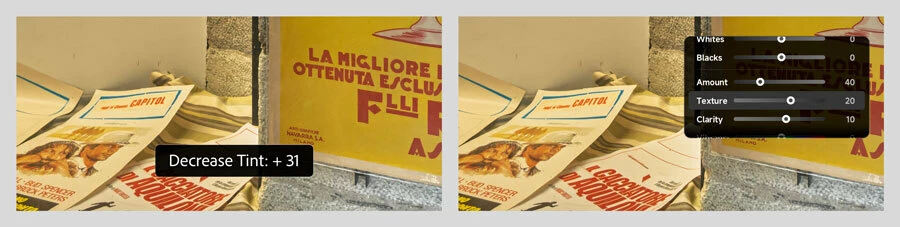
    I think it depends on what you’re seeing. In the picture below…


    On the left is what Lightroom Classic itself displays natively. If that’s what you’re seeing, that’s a feedback pop-up caused by using a Lightroom Classic keyboard shortcut to edit a Basic panel option. It might mean the LoupeDeck is adjusting options by mapping to keyboard shortcuts. (I don’t have a LoupeDeck so I don’t know how it works.) I don’t know of a way to change how that feedback display works. Adobe provides that visual feedback in case the keyboard shortcuts are used when the right panel stack is hidden.


    On the right is what’s displayed by the software for my hardware control surface (a TourBox) when I turn a dial on it. It doesn’t show the Lightroom Classic pop-up because the device’s software is probably adjusting options through the Lightroom Classic API, and the device’s software provides its own pop-up display that the user can customize (which I’ve done). If that looks more like what you want, then johnrellis is correct that it might be made possible by the LoupeDeck driver software.


    johnrellis
    Legend
    June 5, 2026

    There’s no setting within LR for that. You might getter a better answer about Loupedecks via the Loupedeck user group and support:

    https://www.google.com/search?q=louopedeck+user+forum&rlz=1C5CHFA_enUS1064US1064&oq=louopedeck+user+forum&gs_lcrp=EgZjaHJvbWUyBggAEEUYOdIBCDMwMTZqMGoyqAIAsAIA&sourceid=chrome&ie=UTF-8

    Participant
    June 5, 2026

    Thanks a lot for your hint :)