
Participant
May 16, 2019
Question

How do I find missing folders and restore links to the catalogue on a Mac?
  • May 16, 2019
  • 3 replies
  • 534 views

I am using Lightroom classic on my Mac. I imported my photos to Lightroom and they went into subfolders.  I didn't like how they were organized so I went into "Finder" on my Mac and deleted the subfolders and reorganized my photos.  In Lightroom now I can see the photos when I am on 'Library'.  I cannot do anything else with the photos because it says 'The File cannot be found'.  In the Adobe tutorials I learned that organizing them in this way has broken the link between files.  I attempted to restore the links to the catalog based on the Adobe tutorial but it is not working. Please help me!  The files are important to me and I have made a mess of my organization.

    This topic has been closed for replies.

    3 replies

    Tony_See
    Inspiring
    May 19, 2019

    Has this sorted your issue of missing folders?

    Please reply so we can close this thread.

    GoldingD
    Legend
    May 16, 2019
    dj_paige
    Legend
    May 16, 2019

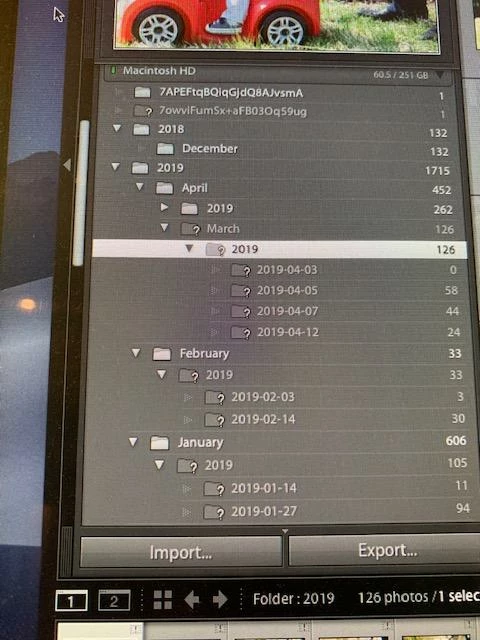
    If your folders are now reorganized by using Finder to something other than the dated folders shown in your screen capture, I don't think there's any easy way to move forward. Reconnecting would have to be done one photo at a time.

    Here's a possibility ... create a new catalog, import all the photos again using MOVE, and tell Lightroom to re-create the dated folders that are shown in the screen capture. Then, you are done with the new catalog. Open the old catalog, and you should be able to reconnect each dated folder easily.

    What's wrong with those dated folders anyway? You need to use Lightroom tools to organize, not old-fashioned dinosaurs like Folders that were never meant for organizing photographs anyway. Use keywords and other metadata to organize your photos, and use dated folders for storage and leave the photos in their dated folders from now on.

    GoldingD
    Legend
    May 16, 2019

    ? mark next to folder equates to a missing folder, right click on folder and select find missing folder.

    Next time move folders and/or images within Lightroom, never ever outside of lightroom.