
Ester K
Known Participant
August 21, 2017
Answered

How do I get beyond the 50,000 (Kelvin?) in temperature? (my photos are too cool)

  • August 21, 2017
  • 3 replies
  • 2093 views

I generally shoot at 5700K, canon 5D mark iii, and later in the evening as we go through the last light the white balance won't be appropriate, but I always forget to change it. When I pull my photos into LR, they are quite cool AND I cannot get them beyond the 50,000 temperature? I need them quite warmer than that. I know it sounds weird, but when your WB is off, you do need that extra... Any ideas how to get things warmer than the 50K? Thanks! Ester
This topic has been closed for replies.
Correct answer Rob_Cullen

Not the perfect answer- but 'quick and easy':

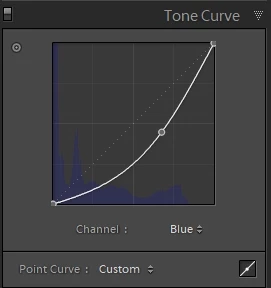
Try the Tone Curve- pull the Blue channel down. (and make a Preset?)

3 replies

Participant
September 28, 2019

Yes you can go beyond 50k Kelvin


I was in a event for photoshoot and they put extremely deep blue neon light for the whole light set up, after I went maximum (50,000) in Lightroom, I right click and edited in in photoshop camera raw filter section. Not perfect but can save your images

Rob_Cullen
Community Expert
Community Expert
September 28, 2019

Interesting! I have been in that situation where the only light was UV. There is difficult White Balance when you have one light frequency, it can only be desaturated or changed to another color/hue.

Nice experimenting with the added Ps Camera raw filter. Thanks.

Regards. My System: Windows-11, Lightroom-Classic 15.3, Photoshop 27.5, ACR 18.3, Lightroom 9.3, Lr-iOS 10.4.0, Bridge 16.0.3 .
KR Seals
Community Expert
Community Expert
August 22, 2017

Are you shooting in Raw or Jpeg?  Raw files have a much greater range of adjustment.

Ken Seals - Nikon Z 9, Z 8, 14mm-800mm. Computer Win 11 Pro, I7-14700K, 64GB, RTX3070TI. Travel machine: 2021 MacBook Pro M1 MAX 64GB. All Adobe apps.
Rob_Cullen
Community Expert
Rob_CullenCommunity ExpertCorrect answer
Community Expert
August 21, 2017

Not the perfect answer- but 'quick and easy':

Try the Tone Curve- pull the Blue channel down. (and make a Preset?)

Regards. My System: Windows-11, Lightroom-Classic 15.3, Photoshop 27.5, ACR 18.3, Lightroom 9.3, Lr-iOS 10.4.0, Bridge 16.0.3 .
Ester K
Ester KAuthor
Known Participant
August 22, 2017

RAW small. Normally I think I'd say what the heck, why do you need to get beyond 50K???? I think it's actually something going on with the presets I'm using. I shoot at 5700K, small RAW, canon, and when it's close to that end-of-daylight, and I apply the preset it takes to to over 30K right away, so there isn't much more up that I can go. I'll contact the guy that created these, wondering if others are having an issue... Meantime it would be nice if I could just go over 50K in temp

Rob_Cullen
Community Expert
Community Expert
August 22, 2017

I am curious to know what type of photo needs >50,000K ?

If shot at 5700K then the original should look 'as it was' .

And if you are using a preset, what is it designed to do?

You know you can always inspect the Develop panels to see the effects of a Preset, and also modify and save another version of a preset.

Regards. My System: Windows-11, Lightroom-Classic 15.3, Photoshop 27.5, ACR 18.3, Lightroom 9.3, Lr-iOS 10.4.0, Bridge 16.0.3 .