

How do I get my file listing like it has been every previous year and not 'messed up' for this year?
Can someone who knows the file structure order that Lightroom likes to follow help me with this new problem I'm having: Every previous year until back in the 1900's when Lightroom was first introduced, I've used the same routine to start a new year's catalog on a new drive or drive partition for the new year. I simply put a folder containing the empty folders inside I want to use to place originals, modified, internet... etc. I copy that empty folder over and over as the container for every shoot and name the new copy folder for the date of the shoot and some relative key information. An example is showing at the top of the folders in the image I'm posting here. Below that is the mess this has become since I started the new year for 2023... The year is hidden and not first, and that is throwing the whole thing off, plus some inside folders have now become key items in the topmost list. This is a mess and I've done nothing different than I've done for many years in a row one. The hierarchical order of the folders is non-existent now.
Example screen shot attached...
TIA,
Ken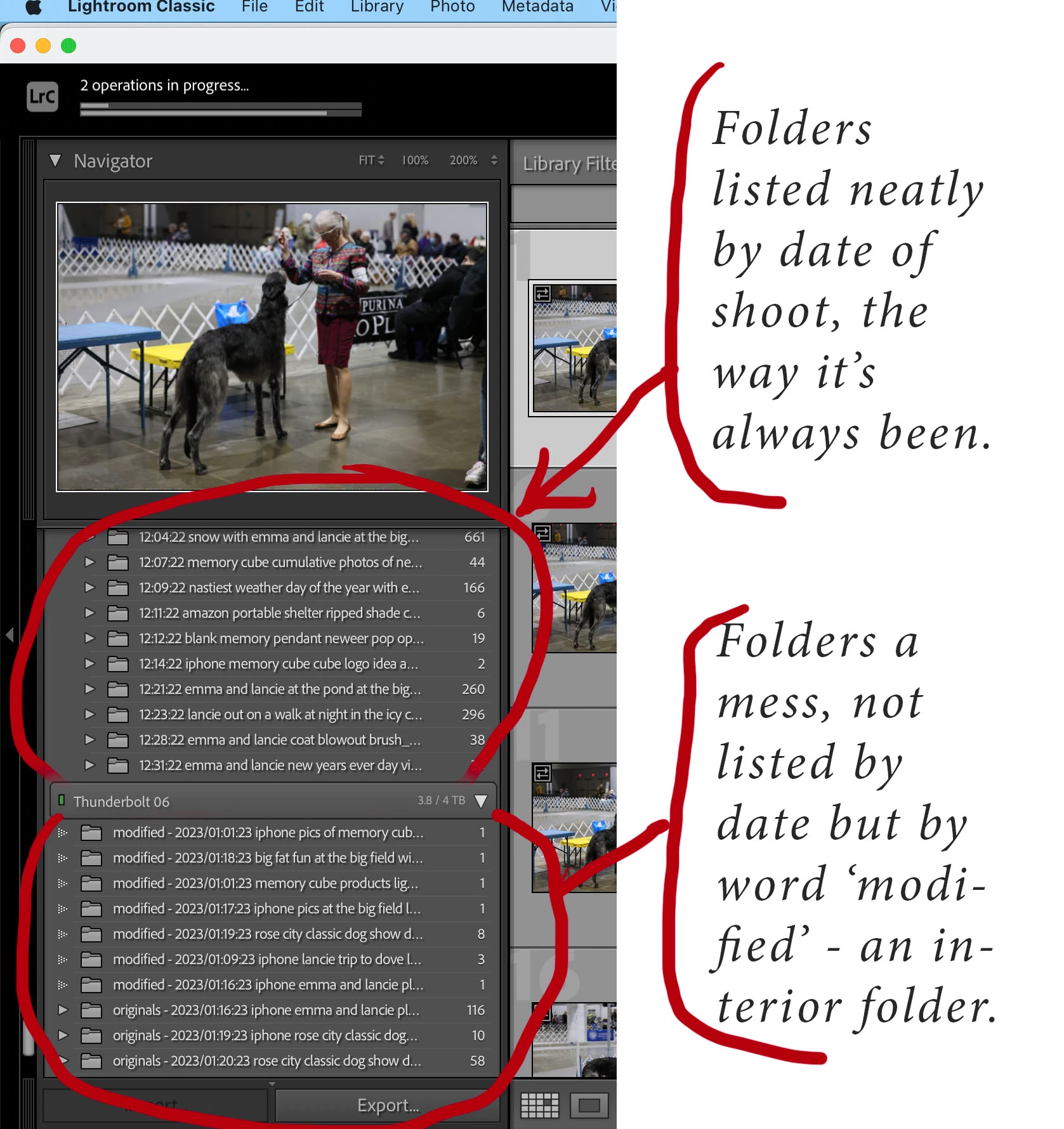


 AdChoices