2Charlie
Inspiring
December 3, 2024
Answered

How do I hide masking icons in LR-C?

  • December 3, 2024
  • 2 replies
  • 298 views

Is there a way to hide these icons? It's quite annoying when refining masking. 



This topic is closed to new replies. Start a new post to keep the conversation going.
Correct answer Per Berntsen

Press H to hide them. Press H again to show them.

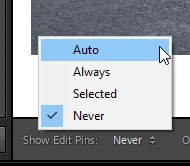
There are more options in the toolbar at the bottom of the screen. If you can't see the toolbar, press T.


2 replies

Per Berntsen
Community Expert
Per BerntsenCommunity ExpertCorrect answer
Community Expert
December 3, 2024

Press H to hide them. Press H again to show them.

There are more options in the toolbar at the bottom of the screen. If you can't see the toolbar, press T.


2Charlie
2CharlieAuthor
Inspiring
December 3, 2024

Thank you so much! I'll give that a try.