
How do I manage this massive disorganized "Lightroom Sync" folder?
1st Question:
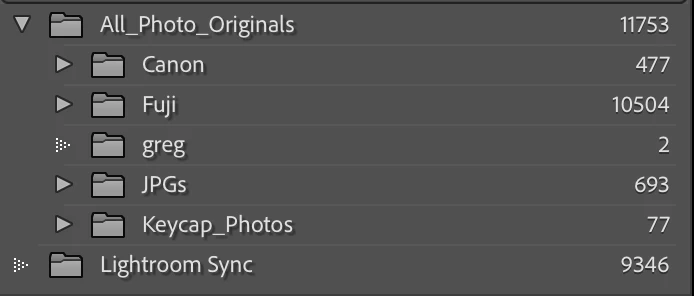
Is there a way to mass edit files to re-point them to their "correct" location now that they are all stuffed into a single folder, and lightroom doesnt see any file/folder conflicts to fix? Other advice is deffinitely appreciated as well on how to fix/re-organize this.
2nd Question:
Can I force Lightroom to organize this sync folder by date? I saw a checkbox in the sync settings to do this, but it must just be for new files that are added. I suppose I could do this myself by writing a script, but it would be nice if the application could do it for me.
Some Backstory:
I have a large (well, large to me) 10k file Lightroom Sync folder that has ended up becoming my gold-copy source file location for a good portion of my photos. When setting up my new macbook I ended up doing an entire catalog export (files included) to start fresh, because any attempt to import my old collections and move their file locations didn't work, because so many files were now tied to the Lightroom Sync folder. My organized colllections with their image ratings and edits are the thing that is most valuable to me.
This is at least functional now, as my collections are all accurate and there are no missing file conflicts, I just dont like that the majority of their source files are pointed to a single massive un-organized folder of pictures, rather than the organized folder structure that I have to store these.
I think I tried out the new (non-classic) version of lightroom at some point on my iPad pro a year or two ago and ended up syncing a good portion of my photo library into this single unorganized sync folder. After that a catalogue got saved, and here we are.
 AdChoices