Participant
April 8, 2018
Answered

How do I remove my name from bottom left of photos?

  • April 8, 2018
  • 1 reply
  • 732 views

I have all of my watermarks turned off and my name still appears on the bottom left of my photos.  How do I remove it?  Help please.  Thank you.

    This topic has been closed for replies.
    Correct answer Michael J. Hoffman

    Hi Stacy,

    I wonder if you have a Loupe Overlay active? This will follow across modules, I believe. I use this when I'm shooting tethered in a studio environment and want to show my logo on the images as they pop up on to the screen.

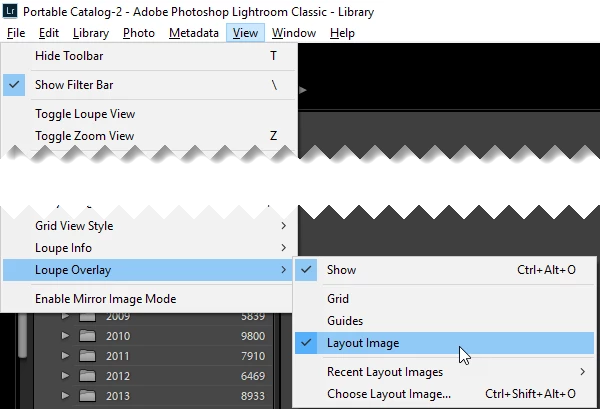
    Ctrl-Alt-O toggles this on and off, or View > Loupe Overlay > Show
    Mike

    1 reply

    Rob_Cullen
    Community Expert
    Community Expert
    April 8, 2018

    I guess you are talking about the Print module in Lightroom- correct?

    You can have both Watermarks and Identity Plate appear on Prints. If your Identity Plate uses your name then that is the most likely reason- you have Identity Plate checked 'on' in the [Page] panel.

    Regards. My System: Windows-11, Lightroom-Classic 15.1.1, Photoshop 27.3.1, ACR 18.1.1, Lightroom 9.0, Lr-iOS 10.4.0, Bridge 16.0.2 .
    Participant
    April 8, 2018

    I am talking about all modules (print, web, etc..).  I have both Watermarks and Identity Plate turned off, and all of the photos still have my name in the lower left.

    Michael J. Hoffman
    Community Expert
    Michael J. HoffmanCommunity ExpertCorrect answer
    Community Expert
    April 8, 2018

    Hi Stacy,

    I wonder if you have a Loupe Overlay active? This will follow across modules, I believe. I use this when I'm shooting tethered in a studio environment and want to show my logo on the images as they pop up on to the screen.

    Ctrl-Alt-O toggles this on and off, or View > Loupe Overlay > Show

    Mike