Known Participant
July 13, 2025
Answered

How does comparable metadata work under the hood?

  • July 13, 2025
  • 2 replies
  • 270 views

I see that Adobe metadata can be compared (where it makes sense).  For example, I can create a Smart Collection where the criterion is "Long Edge > 1000" or "Shutter speed < 1/1000".


I am writing a pluging that creates custom metadata that is a number.  The only data types are string, enumeration, and url.  I would love to have a number type, but that is not in the cards.  If I have a string-type metadata field that represents a number, how can I get the comparison criterion such as is available with Shutter Speed?  Is it that Adobe has secret sauce for its own metadata?

Correct answer johnrellis

[This post contains formatting and embedded images that don't appear in email. View the post in your Web browser.]


There isn't any way to create a smart-collection criterion that will do numeric or alphabetic comparisons, unfortunately.


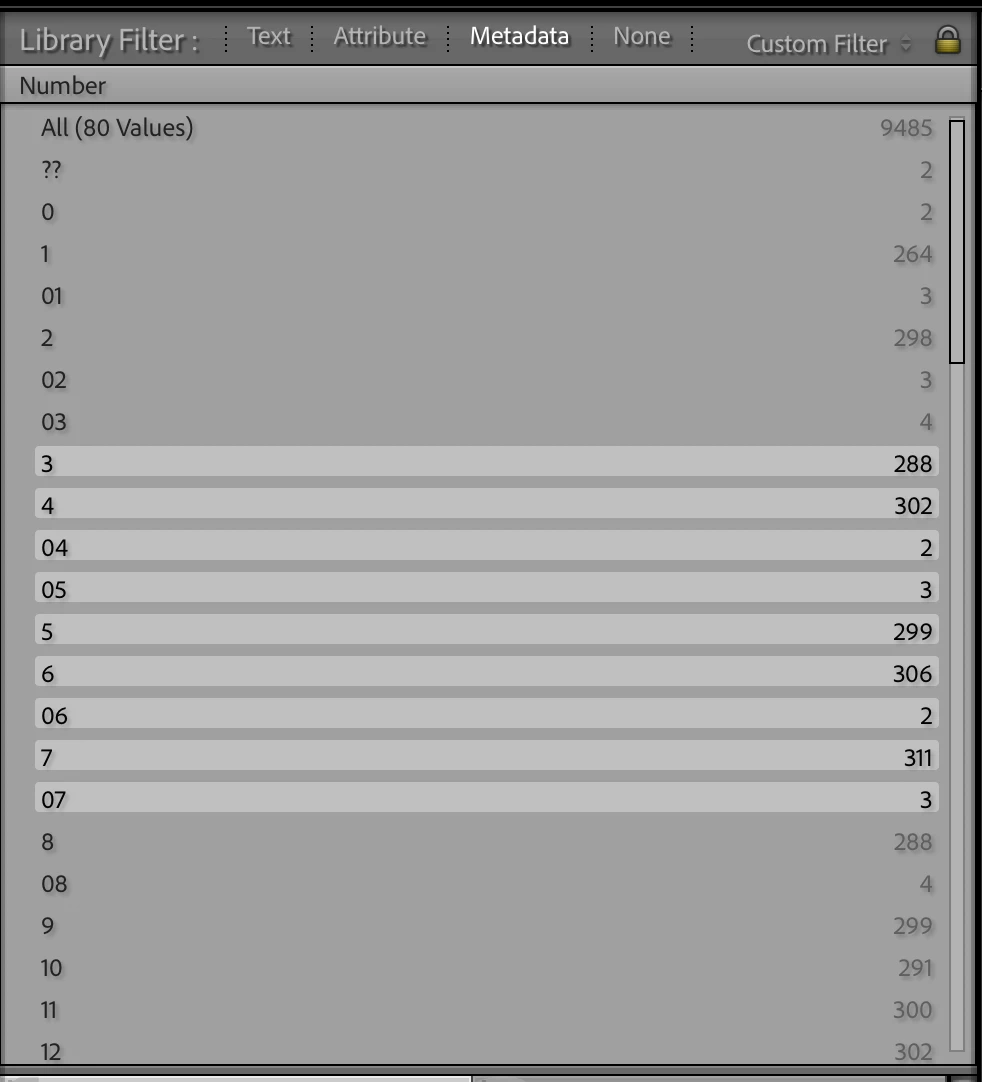
The best you could do is to declare the field both "browsable" and "searchable" in the MetadataDefinition.lua. Then you can use the Library Filter bar's Metadata browser to display the values for all the visible photos, in alphanumeric order. For example, from one of my private plugins:


The user can then click and shift-click to select a range of values.


2 replies

johnrellis
Legend
July 13, 2025

"Is it that Adobe has secret sauce for its own metadata?"


Yes. LR uses the open-source package SQLite to represent its catalog database, and SQLite supports storing numbers in databases.

PaulWaldoAuthor
Known Participant
July 13, 2025

Thanks for the reply John.  Any suggestions for allowing the end user to create less than/greater than criteria in a Smart Collection for my custom metadata?

johnrellis
johnrellisCorrect answer
Legend
July 13, 2025

[This post contains formatting and embedded images that don't appear in email. View the post in your Web browser.]


There isn't any way to create a smart-collection criterion that will do numeric or alphabetic comparisons, unfortunately.


The best you could do is to declare the field both "browsable" and "searchable" in the MetadataDefinition.lua. Then you can use the Library Filter bar's Metadata browser to display the values for all the visible photos, in alphanumeric order. For example, from one of my private plugins:


The user can then click and shift-click to select a range of values.


johnrellis
Legend
July 13, 2025

To test my understanding, your plugin has a custom metadata field that always contains numbers. Because the SDK restricts custom metadata fields to be strings, the number is stored as a string. You'd like to be able to write smart-collection criteria that do numeric comparisons on that field, e.g. "mypluginfield  < 100".


If my understanding is correct, there's no way to do that using built-in features of LR. My Any Filter plugin provides additional operators for doing numeric comparisons on string-valued fields containing numbers, e.g. "mypluginfield < number 100". Any Filter is very powerful, but it's not nearly as convenient to use as smart collections.