gerlos
Participant
Mar 1, 2020 9:27 PM UTC
Answered

How to add external editor name in filename template?

Hello,

I process my images using several different external editors. I configured them in Lr, and I configured a file name template so LR adds "-edit" as suffix to those files. 

Now I'd like to add some more informative suffixes - is it possible to add the external editor name as a suffix or something like that?

I'd like to know from the file name if the photo has been edited in Photoshop or something else. 


I'm running Lr Classic 9.2 on MacOS.


Thanks in advance,

gerlos

This topic is closed to new replies. Start a new post to keep the conversation going.
Rob_Cullen
Rob_CullenCorrect answer
Community Expert
Mar 5, 2020 4:39 AM UTC

use the "Export" feature

Yes, and once you set it up with presets it is very simple!

My example in screen-clips:

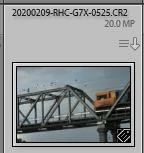
1) The Original File:

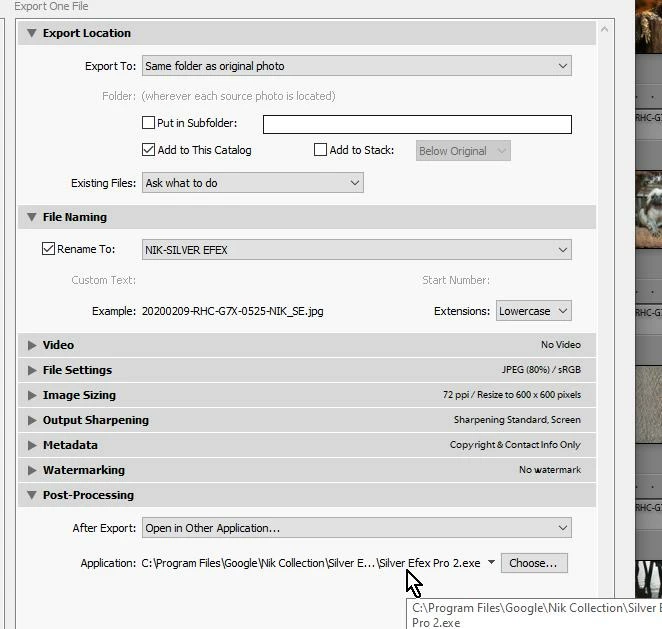
2) The Export dialog:

Export To:  Your desired destination. Same folder? Sub-folder? [Add to the Catalog]- yes!

"Post Processing"- Open in other Application: Your External Editor. (eg. NIK Silver Efex).

3) Make an Export Preset for the specific External Editor: (set 'File type', resize, etc- as needed)

AND- your Rename Preset.  (eg. Filename-External Editor)


4) My result of an image edited in Nik S-Efex back in the Library (sorted by Filename - next to the original):

Easy to repeat any time!

Regards. My System: Windows-11, Lightroom-Classic 15.6, Photoshop 27.8, ACR 18.7, Lightroom 9.4, Lr-iOS 10.4.0, Bridge 16.0.3 .

5 replies

Rob_Cullen
Community Expert
Community Expert
Mar 1, 2020 10:29 PM UTC

You only have one choice to add a suffix to any photo that is saved from any External Editor.

The default being '-Edit'

See the discussion and suggestion from Victoria Bampton at this link where she suggests a work-around to naming specific to the External editor that is used.-

External File Naming by External Editor

Translate
Regards. My System: Windows-11, Lightroom-Classic 15.6, Photoshop 27.8, ACR 18.7, Lightroom 9.4, Lr-iOS 10.4.0, Bridge 16.0.3 .
gerlos
gerlosAuthor
Participant
Mar 4, 2020 11:32 PM UTC

Thanks.

So the workaround is to use the "Export" feature instead of the external editor one. Nice to know. 

Translate
Rob_Cullen
Community Expert
Rob_CullenCommunity ExpertCorrect answer
Community Expert
Mar 5, 2020 4:39 AM UTC

use the "Export" feature

Yes, and once you set it up with presets it is very simple!

My example in screen-clips:

1) The Original File:

2) The Export dialog:

Export To:  Your desired destination. Same folder? Sub-folder? [Add to the Catalog]- yes!

"Post Processing"- Open in other Application: Your External Editor. (eg. NIK Silver Efex).

3) Make an Export Preset for the specific External Editor: (set 'File type', resize, etc- as needed)

AND- your Rename Preset.  (eg. Filename-External Editor)


4) My result of an image edited in Nik S-Efex back in the Library (sorted by Filename - next to the original):

Easy to repeat any time!

Translate
Regards. My System: Windows-11, Lightroom-Classic 15.6, Photoshop 27.8, ACR 18.7, Lightroom 9.4, Lr-iOS 10.4.0, Bridge 16.0.3 .