


Inspiring
April 30, 2023
Answered

How to auto-apply in batch location suggestions in IPTC metadata?

  • April 30, 2023
  • 2 replies
  • 1569 views

Hi,

As far as I understand ist the auto-suggested location information based on GPS data shown in the Lightroom but actually not added to the image. Therefore, you need to manually accept the suggestions. I am specifically referring to the italic suggestions in the IPTC metadata fields Sublocation, City, State, Country and ISO Country Code:
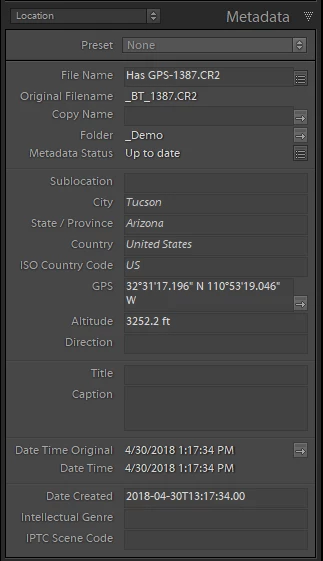
I there any way to select photos in bulk and auto-apply the suggested location info? It would save a ton of time ...

P.S.: I am not looking for a workaround such as manually synchronizing metadata between images, etc.

Thank you,


Philip

This topic has been closed for replies.
Correct answer johnrellis

"the auto-suggested location information based on GPS data shown in the Lightroom but actually not added to the image. Therefore, you need to manually accept the suggestions."


It's more complicated -- Adobe made a mess when they implemented address suggestions. Smart collections, filters, and exporting of metadata recognize these italicized suggestions. But Print > Page > Photo  Info, Save Metadata To File, file renaming templates, and the plugin SDK's photo:getFormattedMetadata() behave as if the location fields were empty.  Adobe acknowledged the bugs years ago but never prioritized a fix:

https://community.adobe.com/t5/lightroom-classic-bugs/p-inconsistent-handling-of-suggested-addresses/idi-p/12664176


If you want commit (accept) all the suggestions in batch, use the free Commit Locations command of the Any Filter pluginAny Tag plugin.

2 replies

johnrellis
johnrellisCorrect answer
Genius
April 30, 2023

"the auto-suggested location information based on GPS data shown in the Lightroom but actually not added to the image. Therefore, you need to manually accept the suggestions."


It's more complicated -- Adobe made a mess when they implemented address suggestions. Smart collections, filters, and exporting of metadata recognize these italicized suggestions. But Print > Page > Photo  Info, Save Metadata To File, file renaming templates, and the plugin SDK's photo:getFormattedMetadata() behave as if the location fields were empty.  Adobe acknowledged the bugs years ago but never prioritized a fix:

https://community.adobe.com/t5/lightroom-classic-bugs/p-inconsistent-handling-of-suggested-addresses/idi-p/12664176


If you want commit (accept) all the suggestions in batch, use the free Commit Locations command of the Any Filter pluginAny Tag plugin.

flip838Author
Inspiring
April 30, 2023

I will try it. Seems to be the Swiss knife for Lightroom 😉

johnrellis
Genius
April 30, 2023

Oops, brain gas, I mean the Any Tag plugin. (You'd think I'd know my own plugins.)

Ian Lyons
Community Expert
Community Expert
April 30, 2023

You need to be in Library Grid View for bulk application of metadata, etc

flip838Author
Inspiring
April 30, 2023

My question is not about how to apply metadata in bulk but how to automatically apply suggested location metadata by Lightroom to images.