Known Participant
April 30, 2025
Answered

How to build a single smart collection with "either" keywords?

  • April 30, 2025
  • 2 replies
  • 571 views

I went on a safari shoot and have keyworded each picture by animal.  I have no issue building a Smart collection for "Zebra" or one for "Wildebeest", but can't figure out how to build a single collection containing "Zebra" or "Wildebeest" (i.e. all pictures of either animal).  Every attempt is limited to those pictures that have both keywords.

What am I missing?

Thanks 
Correct answer drtonyb

@Ross Dillon 


You want a Smart Collection condition like:


Condition_1 AND Condition_2 AND (Condition_3 OR Condition_4)


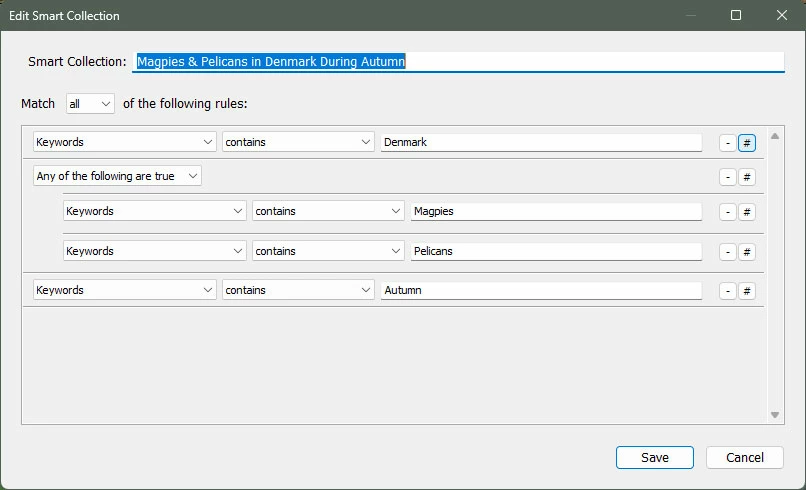
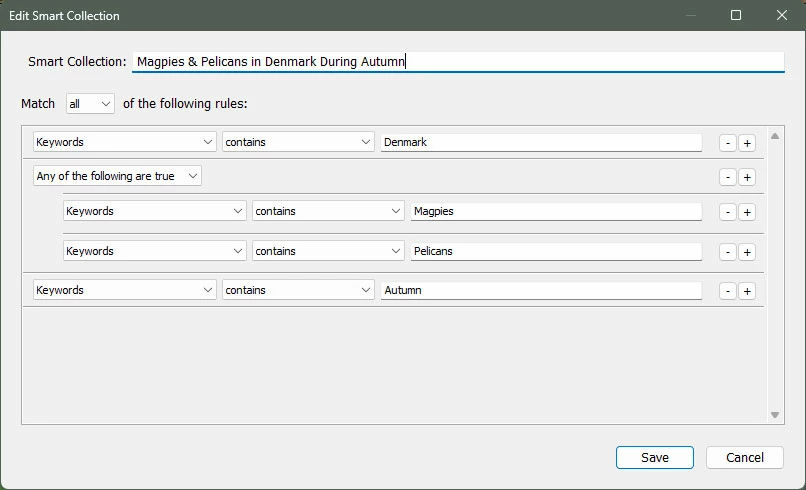
Here is one I created to find photos with keywords being Magpies or Pelicans in Denmark during Autumn:


This criteria is essentially Keywords are: Denmark AND (Magpies OR Pelicans) AND Autumn


To get the "Any of the following are true" sub group, press the Alt/Option key and + buttons change to #, which inserts a sub group when clicked:


This allows the construction of quite complex Smart Collection critera.


2 replies

drtonybCorrect answer
Legend
April 30, 2025

@Ross Dillon 


You want a Smart Collection condition like:


Condition_1 AND Condition_2 AND (Condition_3 OR Condition_4)


Here is one I created to find photos with keywords being Magpies or Pelicans in Denmark during Autumn:


This criteria is essentially Keywords are: Denmark AND (Magpies OR Pelicans) AND Autumn


To get the "Any of the following are true" sub group, press the Alt/Option key and + buttons change to #, which inserts a sub group when clicked:


This allows the construction of quite complex Smart Collection critera.


Known Participant
April 30, 2025

Neat trick...thanks

Legend
April 30, 2025

It's not a trick, it is in the documentation on LrC and Smart Collections.

Rob_Cullen
Community Expert
Community Expert
April 30, 2025

Something like this should do what you want ( my head boggles with 'and'., 'or', 'either' !)

Set Match to "any", and use the [+] to add extra lines in the search.


Regards. My System: Windows-11, Lightroom-Classic 15.1.1, Photoshop 27.3.1, ACR 18.1.1, Lightroom 9.0, Lr-iOS 10.4.0, Bridge 16.0.2 .
Known Participant
April 30, 2025

Except that I have other criteria as well (Location, color label, star rating) and LrC forces the "Any" or "All" choice on all criteria.  I'll see if I can update the OP.


Shame that the Keyword option doesn't have that individually.  

Known Participant
April 30, 2025

Actually it does..."Contains" rather than "Contains All".  Feel like an idiot...