
vandanacathy
Known Participant
January 26, 2017
Answered

How to change sort order from JPEG + RAW (JPEG + RAF) to RAW + JPEG ?

  • January 26, 2017
  • 2 replies
  • 4665 views

Hi,

I've always been a Canon camera owner. Recently I switched to Fuji so now instead of having CR2 + JPEG files it has JPEG + RAF which unfortunately changes the sort order in Lightroom.

When editing I want RAW JPEG RAW JPEG RAW JPEG as I scroll through my photos... it's similar to BEFORE AFTER BEFORE AFTER BEFORE AFTER.

It drives me crazy to see JPEG RAW JPEG RAW JPEG RAW... AFTER BEFORE AFTER BEFORE etc.

JPEG RAW is the order I see the files in on the card so I was hoping there was some way I could change that order in camera but the Fuji forum folks have explained it's all due to J coming before R alphabetically  whereas with Canon C came before J.

What to do?

I also sort by time shot. I use Lightroom 6.

Is there some sort of custom order I can create?

How?

Please advise. Thanks!

This topic has been closed for replies.
Correct answer Rob_Cullen

I think this is more work than I was looking for but I looked through the renaming options and don't see a way to rename the jpegs only. Where is that filter? Thanks.
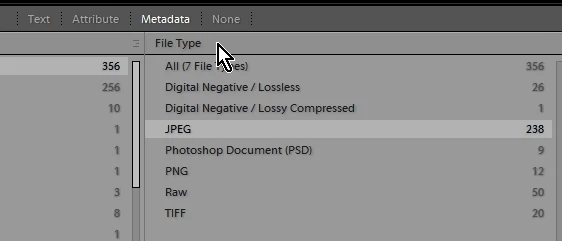


Filter?

1. In the Grid view, click on "Metadata"  (If not visible at top of screen- press back-slash \  .

2. Click a column heading for a drop-menu, and choose "File Type"

3. Click on the menu item "JPG"

4. Select all  [Ctrl+A] JPG files to rename.

5. Press F2 (Function key 2 - The universal Re-name key shortcut)

6. In the File re-name panel you can create a Preset from the Drop-menu and 'Edit'  in the "File Naming: " box.

  as per screen-clip in post#2.

Alternative filter- Text > Filename > Ends with > jpg

2 replies

Participating Frequently
January 27, 2017

Change sort order to 'Added Order', this gives me a RAF, JPG ordering with my X100T.

vandanacathy
Known Participant
January 29, 2017

Lucky you! I've got an XT2 and get JPG RAF.

dj_paige
Legend
January 26, 2017

The only sort orders available are listed under the menu command View->Sort

If none of the work the way you want, then I don't think any built-in sort order will work, and as far as I know, you can't create your own sort orders, other than by doing it manually, which doesn't sound like what you want.

Rob_Cullen
Community Expert
Community Expert
January 26, 2017

You will only be able to change the sort order by renaming the JPG files with an extra character.

eg.    myphoto4567.jpg  >  myphoto4567z.jpg   - which will now sort  after myphoto4567.raf

A re-name preset (F2 and edit) can achieve this with a filter to select only jpg files.

Regards. My System: Windows-11, Lightroom-Classic 15.1.1, Photoshop 27.3.1, ACR 18.1.1, Lightroom 9.0, Lr-iOS 10.4.0, Bridge 16.0.2 .
vandanacathy
Known Participant
January 26, 2017

I think this is more work than I was looking for but I looked through the renaming options and don't see a way to rename the jpegs only. Where is that filter? Thanks.