Known Participant
January 18, 2020
Answered

How to check if DNG is lossy or not?

  • January 18, 2020
  • 2 replies
  • 1612 views

Hi, I've been converting to DNG, but recently starting to use lossy compression DNG for a lot of files. Now I have a mix of lossy and non-lossy DNG.


So, how can I check if DNG files are lossy or not, so I can lossy compress them to save space?

There seems to be a flag called "compression" in the EXIF metadata, that specifies the compression type, but there seems to be no way to search for this within lightroom.
This topic has been closed for replies.
Correct answer Todd Shaner

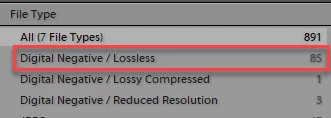
You can use the Filter bar to find all of your lossless uncompressed DNGs. Watch out for the below issue if you have DNGs with Heal Spot Removal applied. When converted to Lossy DNG files they they may appear in the Libary module as pink squares. Your system may or may not exhibit the issue. Just a warning!

https://console.getsatisfaction.com/photoshop_family/conversations/library-artefacts?reply_id=20374320


2 replies

Todd Shaner
Todd ShanerCorrect answer
Legend
January 18, 2020

You can use the Filter bar to find all of your lossless uncompressed DNGs. Watch out for the below issue if you have DNGs with Heal Spot Removal applied. When converted to Lossy DNG files they they may appear in the Libary module as pink squares. Your system may or may not exhibit the issue. Just a warning!

https://console.getsatisfaction.com/photoshop_family/conversations/library-artefacts?reply_id=20374320


Known Participant
February 5, 2020

Ah, I didn't relize it was under file type! Thanks!

I was looking for some sort of "dng" filter.

F. McLion
Community Expert
Community Expert
January 18, 2020

The DNG metadata panel (select from the dropdown) shows Lossy Yes/No.

http://lightroomsolutions.com/full-blooded-and-lossy-dngs/


--- Got your issue resolved? Please label the response as 'Correct Answer' to help your fellow community members find a solution to similar problems. ---