Lightroom's main screen can be set to either Library or Develop at a given time (or else Print, Slideshow, Map...)
The Filmstrip at the bottom of the screen runs through all of these modes, to give you consistent access to a currently presented subset of the overall image library. From the Filmstrip you can also access some recently visited folders / collections, and any view filtering presets you may have saved - as a convenience. For full access and control, the Library mode is required (in the primary window).
Library mode uses two different presentations: Grid view repeating the Filmstrip selection in a more easily managed way; and Loupe view which concentrates on just one image at a time, shown enlarged.
Besides this, Lightroom can present a second application window - typically, though not necessarily, moved onto a different physical display. Within that, you can choose between Grid / Loupe / Compare / Survey / Slideshow and this will then persist (regardless of what the main LR window is doing) until you say different.
Only Library mode (in the primary window) presents your Folders panel and your full Collections list, Presets etc. Also only this gives you the full ability to filter, manage metadata etc - and to Quick Develop.
Only Develop mode (in the primary window) presents your full image editing tools, History, Presets, Snapshots.
It is not possible to mix Library and Develop panels within a single window.
The secondary display (and the mode of the primary display) can be controlled using the little "1" and "2" icons at the left side of the top bar of the Filmstrip, on the main display. That includes, whether to run fullscreen or windowed. Otherwise, F11 key toggles the secondary screen on and off altogether - at least, that is the Windows shortcut.
One little unexpected wrinkle: LR presumes you won't want to have Grid view showing on both displays at the same time, hence whenever you activate that in one window, it automatically flips away from that for the other window.

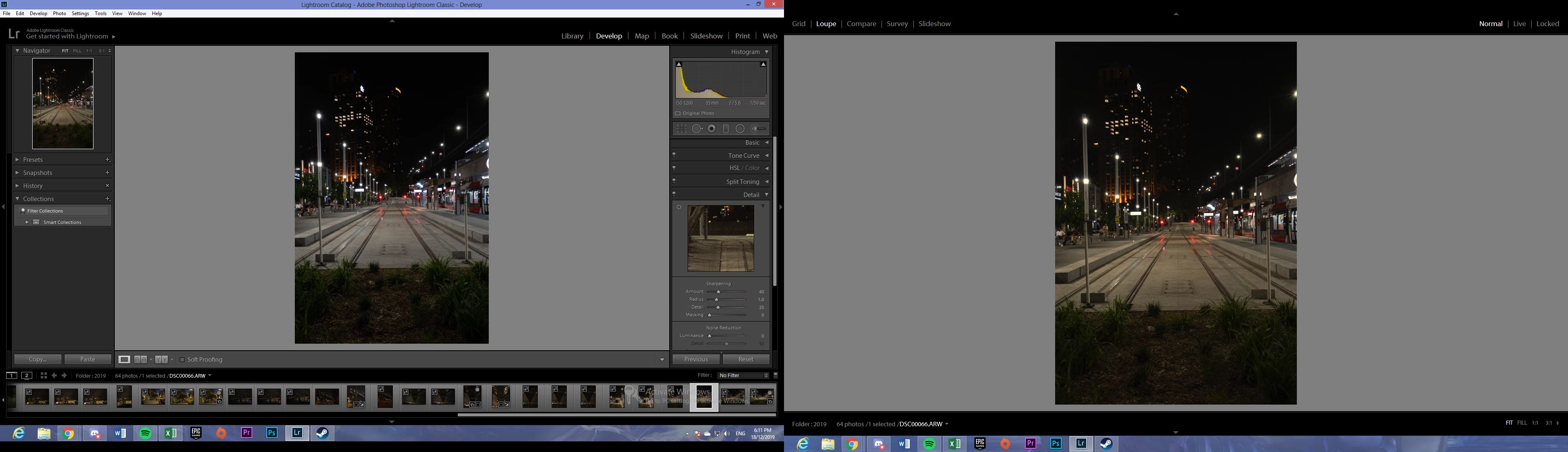 Hey, I know this seems to be a bit of a noob question but how do I close the library panel on the right and return it to the left side panel, underneath snapshots and above history of the develop tab where it used to be?
  AdChoices