Inspiring
July 9, 2019
Answered

How to create a Hierarchial Structure From Existing Keywords

  • July 9, 2019
  • 2 replies
  • 1130 views

I have several Keyword Tags already assigned to photos in my Lightroom CC Catalog. I want to assign one of them to the top level and have the rest be sub-tags. In older versions, I believe all I would do is just drag/drop those that I wanted to be sub-tags into the assigned top level tag. I cannot seem to drag them in the latest version of LR Classic, and I cannot find a specific command to move them.

How do I do this? By the way, dragging and dropping them could be problematic since my Keyword List is quick long and the tags are spread throughout it.  So I am hoping for a command to do this.

TIA
    This topic has been closed for replies.
    Correct answer johnrellis

    A screen recording of your entire LR window as you attempt to drag and drop might shed some light:

    https://www.laptopmag.com/articles/how-to-video-screen-capture-windows-10

    How to record the screen on your Mac

    By the way, dragging and dropping them could be problematic since my Keyword List is quick long and the tags are spread throughout it.

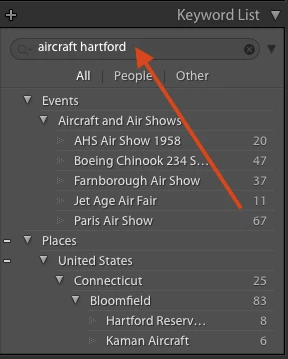
    A trick to make that easier: type one or more search strings in the Keyword List filter box, and you'll see just those keywords containing those search strings:

    Include search strings for the parent keyword and the keyword(s) you want to drag-and-drop.

    2 replies

    johnrellis
    johnrellisCorrect answer
    Legend
    July 9, 2019

    A screen recording of your entire LR window as you attempt to drag and drop might shed some light:

    https://www.laptopmag.com/articles/how-to-video-screen-capture-windows-10

    How to record the screen on your Mac

    By the way, dragging and dropping them could be problematic since my Keyword List is quick long and the tags are spread throughout it.

    A trick to make that easier: type one or more search strings in the Keyword List filter box, and you'll see just those keywords containing those search strings:

    Include search strings for the parent keyword and the keyword(s) you want to drag-and-drop.

    Don26812Author
    Inspiring
    July 10, 2019

    John,

    Once again, you saved my rear end. Way back in the days when you were involved with Photoshop Elements I had a problem with my Catalog. You personally, maybe along with your special software, fixed the problem for me. I was very grateful back then and am once again in your debt.

    I am still not able to drag/drop keywords without using your quick tip. I have no idea why. However using your tip to get the applicable tags close together, I am able to perform the operation.

    When you moved on to support Lightroom users, it was a big loss to Elements users. I think that was about the same time that Adobe abandoned Access as the database engine.

    Thank you very much!

    Don Stouder

    P.S. Have you developed similar software to manipulate the Lightroom database?

    johnrellis
    Legend
    July 10, 2019
    I am still not able to drag/drop keywords without using your quick tip.

    Are you on Windows, and do you have more than about 1500 keywords? There's a longstanding bug where LR can display no more than about 1500 keywords in the Keyword List panel, 1500 collections, or 1500 folders. The workaround is to introduce hierarchy (which you are doing) and then keep most of the parent keywords collapsed, so that at any one time less than 1500 are showing.

    One of the symptoms of having more than 1500 keywords is that drag and drop can fail.

    dj_paige
    Legend
    July 9, 2019

    Drag and drop is the method. I am not aware of anyone else reporting that drag and drop is not working in any version of Lightroom Classic. What is your exact version NUMBER of Lightroom? (we need the version NUMBER and not words like "latest" or "up-to-date").

    Pam_Owen
    Participant
    October 1, 2021

    Cannot drag and drop in keyword list: 10.4 release

    dj_paige
    Legend
    October 1, 2021

    Works for me. What happens when you try? Please describe in detail.