
martins79088083
Participant
June 26, 2018
Answered

How to delete Lightroom on a MacBook?

  • June 26, 2018
  • 1 reply
  • 486 views

Hey,

I have a little problem. A few days ago I downloaded the free version of Lightroom CC and now I want to delete this version of my computer but I can't do this.

Can anyone help me how to delete Lightroom CC of my Mac?

Thank you in advance!
This topic has been closed for replies.
Correct answer john beardsworth

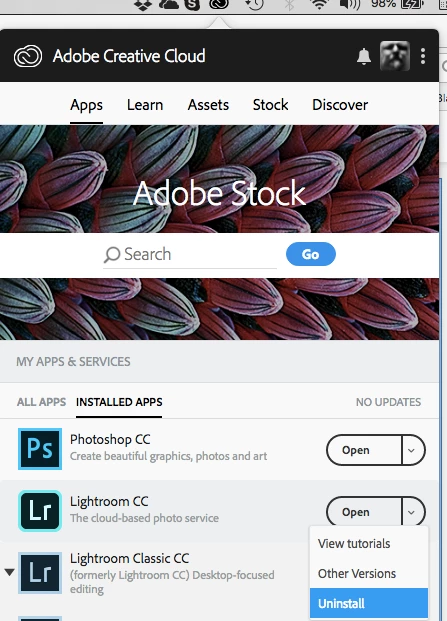
Open the Creative Cloud app and Uninstall is available from the Open button.

Or go into Applications and find LRCC - there's an uninstallation shortcut.

1 reply

john beardsworth
Community Expert
john beardsworthCommunity ExpertCorrect answer
Community Expert
June 26, 2018

Open the Creative Cloud app and Uninstall is available from the Open button.

Or go into Applications and find LRCC - there's an uninstallation shortcut.