
Inspiring
March 17, 2023
Answered

How to display exposure info in thumbnail?

  • March 17, 2023
  • 1 reply
  • 621 views

With the latest Lightroom Classic update, a number of personal settings were"erased". Among them was the exposure  info that used to display for me when I would pause the arrow over the thumbnail.  At present, the image #, date and time are displayed instead.  How do I get the exposure info (f stop, shutter speed, iso) on the thumbnail instead?  I've tried researching the old Martin Evening book, and spent about a hour fiddling with Lightroom Classic in both the Library and Develop modes.  The solution must be hidden right in front of me.  Help!  Thanks.
This topic has been closed for replies.
Correct answer Conrad_C

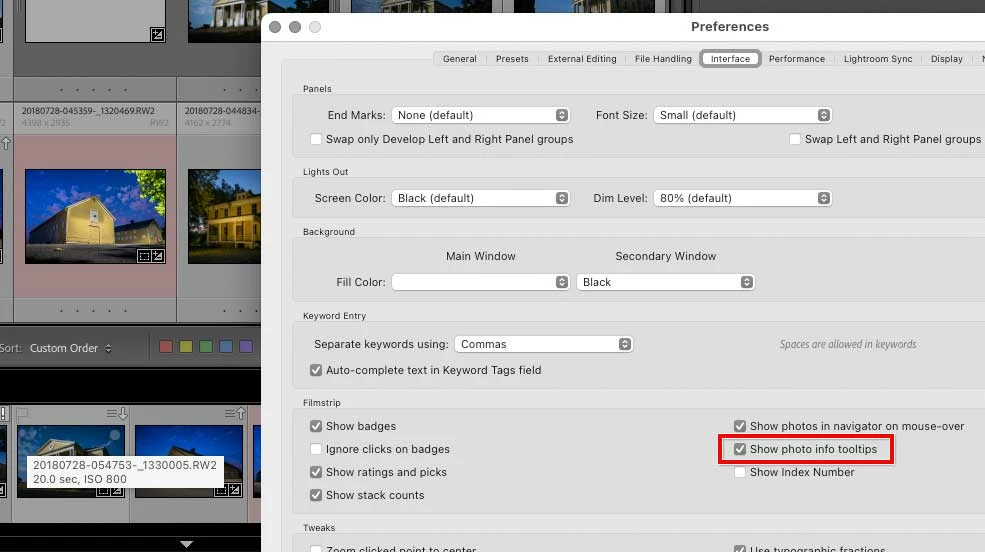
Is the tool tip rectangle shown at the bottom left corner of the image below what you want? If so, make sure Show Photo Info Tooltips is enabled in the Preferences dialog box, Interface tab.


If you mean the info shown with a thumbnail in the grid or filmstrip, then choose View > View Options.

1 reply

Conrad_C
Community Expert
Conrad_CCommunity ExpertCorrect answer
Community Expert
March 17, 2023

Is the tool tip rectangle shown at the bottom left corner of the image below what you want? If so, make sure Show Photo Info Tooltips is enabled in the Preferences dialog box, Interface tab.


If you mean the info shown with a thumbnail in the grid or filmstrip, then choose View > View Options.

Inspiring
March 17, 2023

Thanks Conrad.  I checked the interface tab. The Tooltips box was already checked.  I checked the Grid/Filmstrip view options again.  I found that switching from Grid to Loupe view and then View Options worked.  The exposure info is now displayed on the thumbnails.