
Inspiring
September 27, 2025
Answered

How to export keywords as text list in LR Classic

  • September 27, 2025
  • 1 reply
  • 179 views

I have an extensive keyword lsit, with heierarchy.  In an older version of LightRoom Clasic, there was a command that would export this list to a text file -- it worked.  How do I do this in LR 14.5.1?  The LR Classic Help section goes directly to Adobe Bridge.
Correct answer Ian Lyons

Adding to reply by @dj_paige 


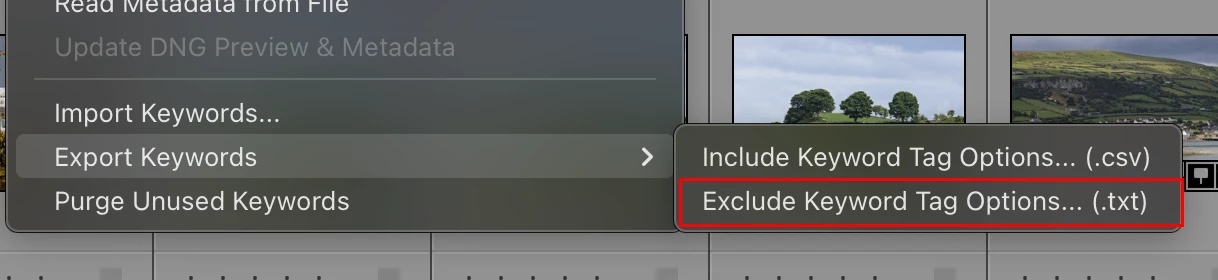
You choose the 'txt' option as shown in attached screenshot.


1 reply

dj_paige
Legend
September 27, 2025

In the Metadata menu, choose Export Keywords.

Ian Lyons
Community Expert
Ian LyonsCommunity ExpertCorrect answer
Community Expert
September 27, 2025

Adding to reply by @dj_paige 


You choose the 'txt' option as shown in attached screenshot.


Inspiring
October 5, 2025

Yes!  Once I found the export keywords command, the rest followed.