
Inspiring
August 9, 2018
Answered

How to get the scroll bar back on the Lightroom Classic Develop screen?

  • August 9, 2018
  • 2 replies
  • 2126 views

As of Thursday, 08-09-2018 the scroll bar has disappeared from the Lightroom Classic Develop module screen.  One can still open the various controls on the right hand side; but only one at a time, and clicking on one closes any control one already had open.  I prefer the prior setup with the scroll bar and the option to keep as many controls fully visible as possible.  Is this a glitch or an actual modification?  A check of the Adobe Creative Cloud app shows no new updates for Lightroom Classic CC.  Is there a way to get "yesterday's" scroll bar back?  The current setup is a nuisance.  Thanks for any info.
This topic has been closed for replies.
Correct answer JohanElzenga

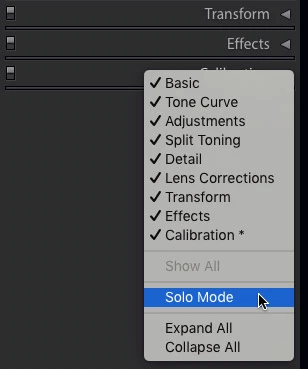
Right-click anywhere in an empty space of one of the panel names. A contextual menu comes up. Uncheck the 'Solo Mode' menu.

2 replies

AxelMatt
Community Expert
Community Expert
August 9, 2018

I'll think the solo mode for the control panel is activated.

Please refer this video: Solo Mode for Lightroom Panels - YouTube

My System: Intel i7-8700K - 64GB RAM - NVidia Geforce RTX 3060 - Windows 11 Pro 25H2 -- LR-Classic 15 - Photoshop 27 - Nik Collection 8 - PureRAW 6 - Topaz Photo AI
JohanElzenga
Community Expert
JohanElzengaCommunity ExpertCorrect answer
Community Expert
August 9, 2018

Right-click anywhere in an empty space of one of the panel names. A contextual menu comes up. Uncheck the 'Solo Mode' menu.

-- Johan W. Elzenga
Inspiring
August 9, 2018

Thanks for the quick response - and the correct answer.