Inspiring
April 25, 2017
Answered

How to import and handle the jpeg files in Lr?

  • April 25, 2017
  • 2 replies
  • 1040 views

I imported some jpeg pictures to lightroom, but after I edited and exported them, I can't find where they are in Lr now.

What happened to them? They are in same folder that I put all of other pictures and nothing unusual has happened. Just no more raw pictures, only Jpegs.

Should I have done anything before importing them?
    This topic has been closed for replies.
    Correct answer Rob_Cullen

    Hi Jim

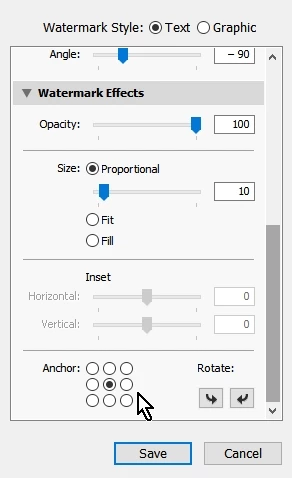
    I tried to add a watermark to my pictures in Lightoom, but can't move the watermark to the center of the picture, it is just sitting in the left corner. Is there any way of moving it at all or it is meant to be fixed in a bottom corner. I moved the sliders already but nothing changed.

    Thanks,

    farah


    Go: Menu > Edit > Edit Watermarks

    The place to set the watermark location is at the bottom of the dialog options- scroll down- click in one of the "Anchor" positioning circles.

    2 replies

    ManiacJoe
    Inspiring
    April 25, 2017

    When you exported the edited versions of the JPG files, did you export them to the same folder as the originals or to a separate folder?

    If you exported them to the folder containing the original JPG files, you may have overwritten the originals with the edits, depending on the "existing file" options in the Export dialog.

    Inspiring
    April 25, 2017

    I always export them to a separate folder, I did the same this time as well.

    I have the exported files, I am just trying to find them in Lr.

    JP Hess
    Inspiring
    April 25, 2017

    If you exported them to the same folder, and you want them included in the catalog, you can go to the library and right-click on the folder and choose to synchronize the folder. Lightroom should indicate that there are images to add, and it will then add them to the catalog. But don't be confused because the new images will be treated as a new import and will be the only images displayed. You will have to right-click on one of them and choose to go to the folder in library to get back to the folder that displays all the images.

    JP Hess
    Inspiring
    April 25, 2017

    I don't understand your question. If you imported JPEG images and edited them, and then you exported them, there were no raw images involved. Why would you expect there to be raw images after the export process was completed? When you import the JPEG images, you specify the destination folder just like you do when you import raw images. When you export JPEG images, you specify the destination for the exported images just like you do when you export raw images.

    Inspiring
    April 25, 2017

    Hi Jim,

    Thanks for your comments. I am not expecting to get Raw pictures in my Lr Catalog. What I assume is that I should be able to see those pictures in a folder that I have placed them.

    All of my other pictures, are visible when I run the light room. Of course in their original folders, but why can't I see those Jpegs in Lr? I can just see the exported files and it has nothing to do to Lr. Because they are in my desktop in a separate folder.

    Thanks again,

    farah

    JP Hess
    Inspiring
    April 25, 2017

    I'm still confused. You exported the images from Lightroom so they must have been in Lightroom at some point.