
grégoirea16244058
Participating Frequently
April 27, 2019
Question

How to install Lightroom6 ?

  • April 27, 2019
  • 5 replies
  • 1066 views

Hi,

I have a new computer, and want to install my Lightroom6 on it.

On Adobe website, I am able to find my bill number, serial ID, and a link to the exe install:
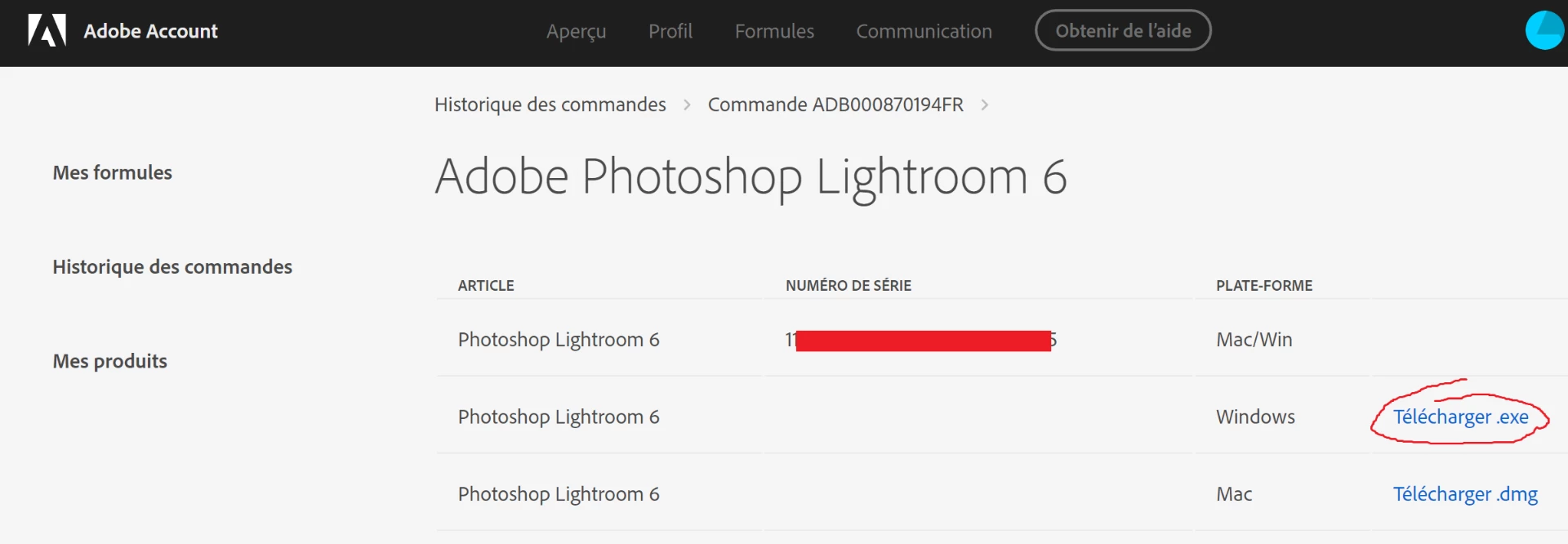
I donwload exe, run it, it extract things under C:\Users\grego\Desktop\Adobe\Photoshop Lightroom 6.0. Then it runs the Set-up tool, I select "New Installation, I bougth the product", fill the serial ID... and got stuck with following window:
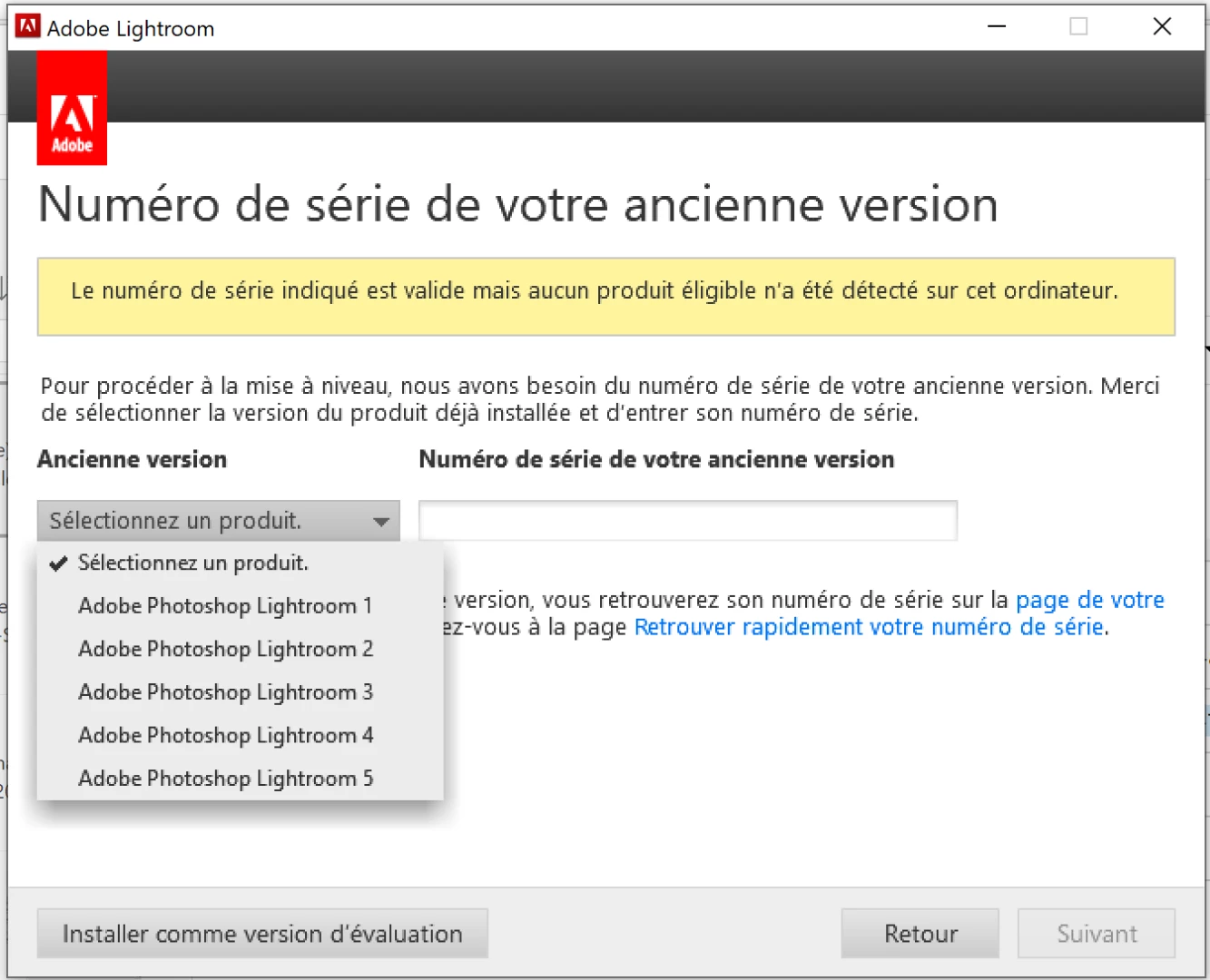
Yellow box from french means "Serial ID is valid, but no eligible product product has been found on this computer".

And only available Lightroom are 1 to 5, not 6.

Ok, keep calm. I restart instalL, still from C:\Users\grego\Desktop\Adobe\Photoshop Lightroom 6.0, and now I select "trial 30 days".

Installation is ok, I run it.... this is Lightroom CC, not 6 as expected by the name of the installer.

So my question is simple : How can I install the lightroom 6 I bought in Sept'17 ?

Regards,

Grégoire.

This topic has been closed for replies.

5 replies

Community Expert
April 27, 2019

Be very careful with the online subscription. The 1TB one is with only Lightroom CC. This is a completely different beast than you are used to. It is a port of the mobile version of Lightroom to the Desktop. It stores all your images in the cloud and cannot print, export to anything to sRGB jpeg and misses basically all the Lightroom features you are used to (including Map by the way!). The logical next version of Lightroom after 6 is called Lightroom Classic and is included in the Photography plan. The one that also includes Photoshop. Again Lightroom CC (or now just Lightroom) is NOT the Lightroom you are used to. Most people need Lightroom Classic.

grégoirea16244058
Participating Frequently
April 28, 2019

Oups, thank you Jao.

I will cancel my order and switch to classic+ps.

Regards

grégoirea16244058
Participating Frequently
April 27, 2019

Anyway, don't spent too many time with my problem. I really appreciate your effort,

I am sure there is a real trouble with LR6 migration, this is not acceptable.

The good thing : During my investigations, I realize the monthly subscription also have a 1To of storage. This is for me a real argument. So I will migrate to this licence (and it will solve the google map issue...)

Thank you again for helping, even if the original problem is not solved !

Regards.

grégoirea16244058
Participating Frequently
April 27, 2019

Thank you Just Shoot Me and Jao Vdl.

Since after entering LR6 licence installer says licence is valid and not asking for older license, I guess I bought full LR6 release.

Still stuck...

Regards,

Just Shoot Me
Legend
April 27, 2019

grégoirea16244058  wrote

Thank you Just Shoot Me and Jao Vdl.

Since after entering LR6 licence installer says licence is valid and not asking for older license, I guess I bought full LR6 release.

Still stuck...

Regards,

What do you mean by Still Stuck?

Stuck with what?

grégoirea16244058
Participating Frequently
April 28, 2019

By stuck I mean I am still not able to install LR 6.12.

I have the two licences ID LR4 and LR6, both from Adobe.

When running LR6 install:

- With LR4 ID install says : not a valid licence

- With LR6 ID install says : valid licence but no corresponding product (and it don't ask for an LR4 ID).

Regards,

Grégoire.

Just Shoot Me
Legend
April 27, 2019

To install a newer upgrade version of LR you need both the newer version serial number and an older version serial number.

Since you say you have LR 4 then you must have the serial number for it. If you don't have a copy of the LR 4 serial number then you can login to the Adobe website with your old Adobe ID and find it.

If that doesn't work do you have the old computer that LR 4 was installed on? If you do the serial number is stored on the hard drive of that old computer.

grégoirea16244058
Participating Frequently
April 27, 2019

Hello,

Thanks for helping,

This does not solve the problem.

With LR4 ID (found on my xxx@gmail.com account), yellow box says the licence ID is not valid.

With LR6, yellow box says licence ID is valid, but no corresponding tool.

If somebody have a direct link to Lightroom 6.12 installer, I think it will help, because I think in the LR6 installer, there is only the subscription licence (LR 6.14), and my licence is perpetual (6.12). This is only a suggestion.

Regards,

Grégoire.

Community Expert
April 27, 2019

You should put the LR6 license in the first box, then when it comes up to ask you for proof of an older lightroom version, select Lightroom 4 in the popup you show above and enter the lightroom 4 license number next to it. This should allow you to install.

Community Expert
April 27, 2019

It looks like your license was bought as an upgrade to an older version. Do you have a license number for the older Lightroom in your order history on the adobe website?

grégoirea16244058
Participating Frequently
April 27, 2019

Thank you for helping !

In july'12, I bought a LR4 licence, with a first old Adobe account (xxx@gmail.com)

In sept'17, I bought LR 6, with my current Adobe account (xxx@free.com). I am not sure it was an upgrade, there is nothing mentioning this on my account.

Thanks to your suggestion, I tried to install with xxx@gmail.com with licence ID LR4. I still have same message regarding non matching product.

In the same time, I continued my investigations : It appeard my working LR6 on my old Mac computer was a 6.12 version.

And it looks like the Lightroom 6 exe installer is 6.14, renamed to LightroomCC. Is it a possible issue ?

The only thing I want is to install 6.12 on my new computer !

Regards.