
adriant12105070
Inspiring
September 23, 2023
Answered

How to move multiple Sky photos from Lightroom Classic to Photoshop Sky Replacement

  • September 23, 2023
  • 2 replies
  • 728 views

I have created a collection of several sky photos in Lightroom Classic, and would like to transfer them as a collection to Photoshop Sky Replacement. It is really tedious to move them one at a time. Can anyone suggest a method to do a file transfer ie. all cloud photos, all blue skies etc? Thanks.

Adrian
This topic has been closed for replies.
Correct answer Ian Lyons

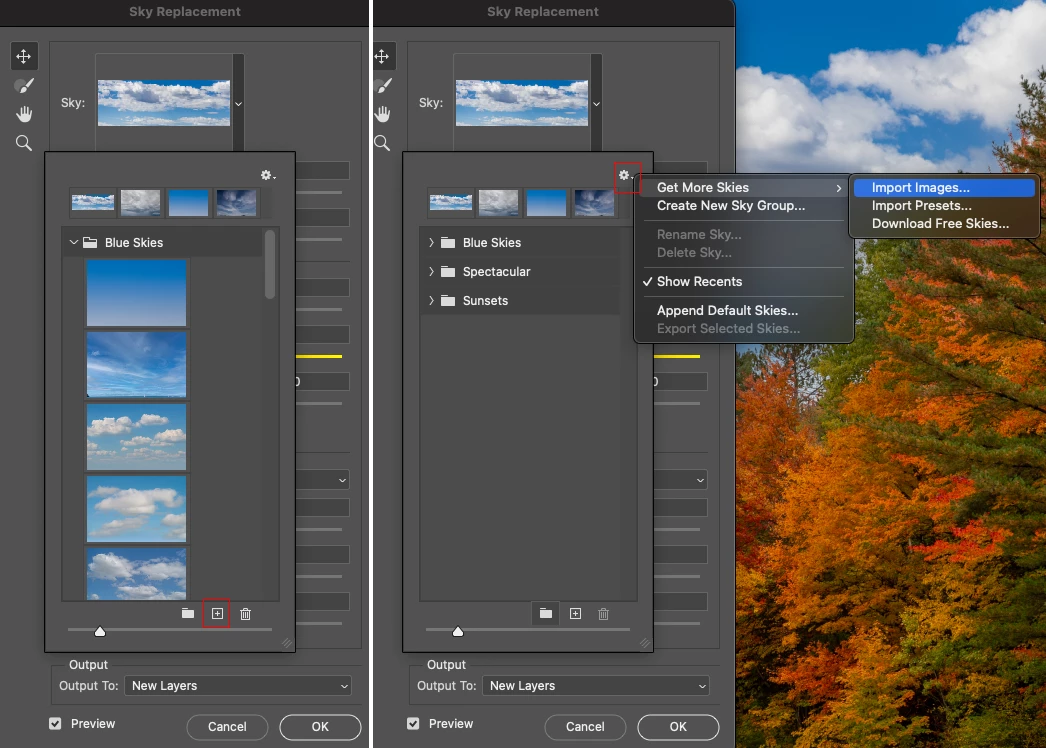
You'll need to export (File > Export) the sky photos from Lightroom Classic to a folder. The folder contents can then be added/imported into Photoshop from within the Sky Replacement dialog as shown in attached screenshot.


2 replies

Ian Lyons
Community Expert
Ian LyonsCommunity ExpertCorrect answer
Community Expert
September 23, 2023

You'll need to export (File > Export) the sky photos from Lightroom Classic to a folder. The folder contents can then be added/imported into Photoshop from within the Sky Replacement dialog as shown in attached screenshot.


adriant12105070
Inspiring
September 23, 2023

That was so easy. Thank you so much!

John T Smith
Community Expert
Community Expert
September 23, 2023

You need to ask program questions in the forum for the program you are using
To ask in the forum for your program please start at https://community.adobe.com/
Moving from Using the Community (which is about the forums) to the LC forum

GoldingD
Legend
September 23, 2023

Actually would this not belong in the Photoshop community?

It is a function in Photoshop.


And to the OP, see:

https://www.youtube.com/watch?v=YmYEre2ceNk

although you select your images,  it those bought/aquired online.


and/or:

https://www.turnmeyer.com/blog/2020/11/18/adding-your-own-sky-in-adobe-photoshop-2021-sky-replacement